
Exploration formations
A formation is the party as one thing: a marching order, one token on the map, one exploration clock, and party-wide checks that resolve every member.
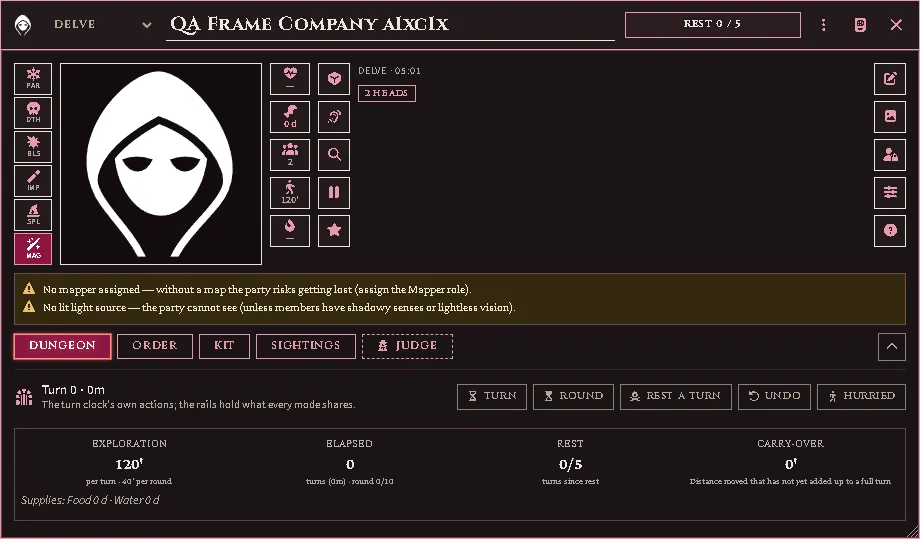
The party sheet in a dungeon: the mode and the rest bar in the title bar, the party’s picture between the rails of saves, figures and quick tools, the warnings it is under, and the Dungeon tab’s own actions at its head.
Build one
Section titled “Build one”Select the party’s tokens → Add to party, or create a Party Formation actor and add members from its sheet.
Members take roles — front, flank, rear, mapper, light-bearer — and the order is the marching order. The party actor itself holds almost nothing; the formation record holds the state.
When a formation takes the field, member tokens are stashed and one party token stands in their place. Disbanding restores every stashed token to where it came from.
The party sheet
Section titled “The party sheet”The party’s name and the mode it travels in sit in the window’s title bar, beside a bar: on a journey it fills with the hours walked of the day’s march, in a dungeon or a city with the turns since the last rest. The crest opens the marching order. Below is the party’s picture between rails of square cells, the same cells in every mode:
- The saves, left of the picture. Press one and every member throws it, on one card. The sixth cell, Magical source, says whether the throws are against magic, which decides whether each member’s bonuses against magic count.
- The figures: hit points (how many are hurt), supplies (days of food and water), mouths, pace and light, each read the way the mode reads it. Press hit points to adjust them, supplies to ration, and pace to switch between careful and hurried (on a journey, to open Movement); mouths and light open the marching order and the kit.
- The quick tools: the encounter throw, the party’s checks, a search, the pause and experience.
- The reading: the mode, and on a journey the day, the hex and the season; the clock; the territory and what the party follows, its heads, the pause, and on your seat whether it is astray; then the party’s description.
- The sheet tools: the description, the picture, ownership, Tweaks (the table the party draws wandering monsters from where no zone names one) and the Key, which names every glyph on the rails.
The tabs are named by the mode. The first is Dungeon, Wilderness or City, with that mode’s own actions at its head; then the marching order (Order in a dungeon, Train on a journey, Company in a city), Kit, Sightings (the journey’s log) and, on your seat alone, the dashed Judge tab. The chevron at the end of the tab row folds the tabs away and leaves the frame, and the sheet remembers that for you, party by party. Each tab scrolls on its own and keeps its place, and the whole window follows the type size setting.
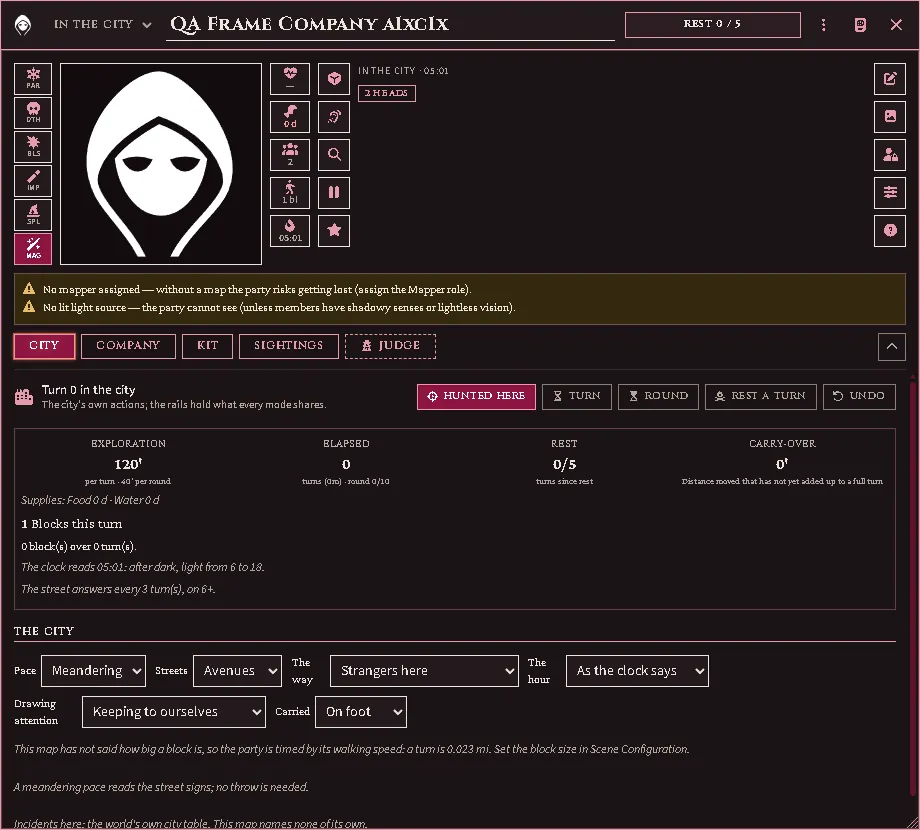
In a city: the City tab first, with Hunted here at its head, then Company, Kit, Sightings and the Judge’s dashed tab.
A player’s sheet is the same frame without your parts: no saves, no quick tools, the Key alone among the sheet tools, and no Judge tab. Hit points and supplies only read there; mouths and light still open their tabs.
Deploying, and which way the column points
Section titled “Deploying, and which way the column points”A combat deploy lays the marching order out as a block: files abreast, ranks behind, facing the way the party token faces. The heading is the token’s own rotation snapped to a cardinal — core rotates the token every time it is dragged or walked, so the party token is already a record of which way the party last marched, and turning it by hand (Shift+scroll with it selected) turns the whole deploy.
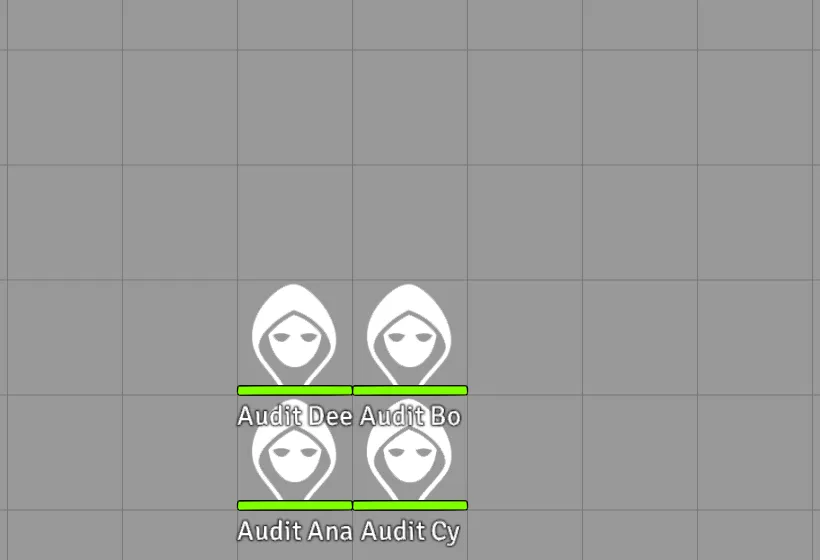
A two-file block deployed on the canvas, trailing away behind the party token’s facing.
An unrotated token faces south, so a party whose token has never turned deploys its column trailing away to the north. (Before v4.8.0 the column always trailed south of the token regardless of facing — if your table had gotten used to that, turn the party token to face north and the old layout is back.)
The party token itself wears the formation’s face (since v4.14.0): as wide as its frontage in feet — each body’s width is the March width per body world setting — and as deep as its ranks, at whatever scale the scene uses. Turn the column and the token’s width and depth swap with it.
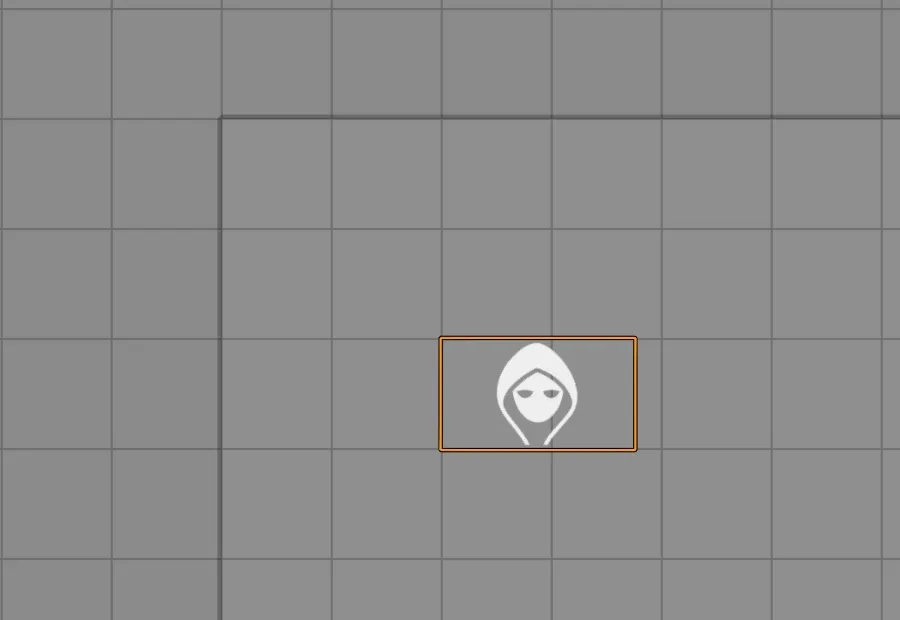
Three abreast on a 5’ grid: the party token stands its real width.
Saved marching orders
Section titled “Saved marching orders”The head of the party sheet’s Order tab has Save order, which keeps the current arrangement under a name, and Load order, which puts one back; the party token’s HUD carries a form up button that applies a saved order and gathers everyone on the map back inside the token. With one order saved the button applies it outright; with several it asks.
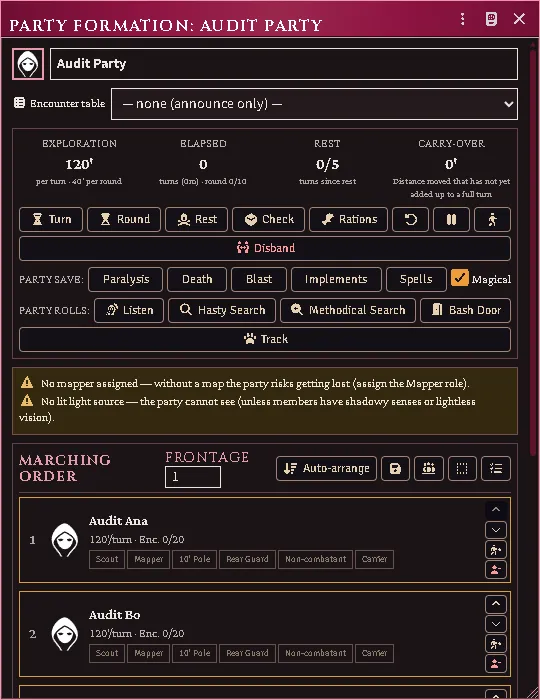
The party sheet’s march controls: frontage, the order, and the save that a form-up restores.
A saved order records the shape — who stands where, their roles, how many march abreast — and nothing else, so restoring one can lose an arrangement but never a character. Someone saved but gone is dropped and the line closes up; someone new keeps the back rank.
Calling it from a macro
Section titled “Calling it from a macro”The same calls the sheet uses. The formation always comes first, and none of these is a dry run:
saveTemplate(formation, name)— stores the current arrangement. Writes the world setting.applyTemplate(formation, order)— rewrites the formation’s marching order.orderis either a saved order (fromgetTemplate(id)orlistTemplates()) or its id; both work.formUp(formation, order)— apply, then gather the deployed back in. Writes the formation and moves tokens.deleteTemplate(order)— forgets one, by order or by id.
To ask what an order would do without doing it, call reconcile(members, cells) — it is the only call here that computes without writing.
Getting an argument wrong throws immediately and says what it wanted, rather than half-working: reversing the pair reports “arguments are reversed — the formation comes first”, and handing an applying call something that is neither an order nor an id names what arrived instead.
Note that applyTemplate here is the formation one. acks-extras
publishes a second, unrelated applyTemplate(actor, classItem, template, …) on
the classes api for character generation; they share a name and share nothing
else.
Overland travel
Section titled “Overland travel”The party sheet has one surface for every kind of travel: its first tab, named for the mode, with the clock strip at its top. In a dungeon it counts turns; on a journey it counts miles and hours; in a city it counts blocks. The mode is picked from the selector beside the party’s name in the title bar, and a map you have set up as a wilderness or a city map picks it for you when the party token lands there — as does a map whose cells are a mile or more across, which is read as wilderness unless you have said otherwise. Setting a map’s grid distance or units after the party is already on it counts as landing there.
Every number behind this section is printed in your books and arrives through the importer. Until you have imported them the strip still works, and says plainly what it cannot price — it never guesses a distance, a target or a toll.
The day
Section titled “The day”Drag the party token and the day is walked. The strip reads how fast the order moves (miles an hour, and miles in a day’s march), how far it has come and how many hours that took against the hours the day holds, which hex it stands in and how many it has entered, when the next encounter throw falls, and the world clock with day or night and the hours left to dusk or dawn. The clock runs as the miles are spent: torches and tracked spells burn down on the road exactly as they do underground.
What the order is crossing is read off the map under the party token. The Wilderness tab’s Country section shows it as four cards — the ground, the road, whether the party is following a river or a route it already knows, and the territory — with the table its encounters draw on beneath them; on your seat the Sky section reads the climate the same way. Each answer comes from the hex the token stands in, as the battlemap’s Country brush painted it and the roads and rivers you drew cross it (see the battlemap guide); where the map says nothing, from what the scene says of its own country; and on a map that says nothing at all, from whatever the party had been given before. Players see the cards. Your seat also shows where each answer came from, and a card whose hex the brush has not painted offers Paint this hex, which opens the brush on that card’s layer.

The Country section on your seat: a ground your word overrides, with its chip and clear; a road given where the map says nothing, with its pen mark; a river read off the map; and a territory from the scene’s default, offering Paint this hex.

After a drag from a painted hex into one nobody painted: the cards read the scene’s own country, not the paint the party left behind.
On a journey the party’s picture becomes a drawing of the hex the token stands in: the scene’s own background under it, tinted by the ground painted there, the roads and rivers that cross it, the points of interest the party has found (on your seat the ones it has not found as well, as dashed rings) and the party’s mark at its middle. A square grid draws the square; a map with no grid draws a square one grid unit across. The drawing is not a button: the picture itself is changed from the sheet tools.
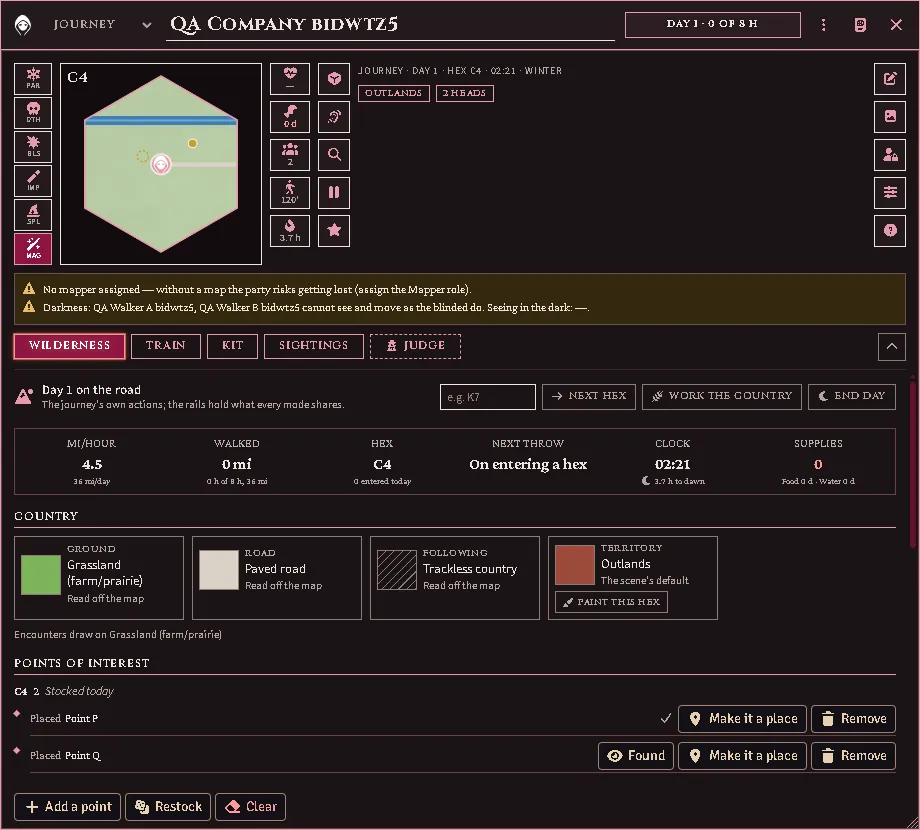
The sheet on a journey: the hex drawn in the picture frame, with the road and the river that cross it, the point the party has found and the one it has not; the Country cards beneath, each saying what answered it.
Your own word goes in The Judge’s hand, on the Judge tab: one select for each of the six — ground, encounter table, territory, climate, road and following — with what the map reads there written beside it. A choice there stands over the map until you clear it. A card your word overrides wears an Override chip with its own clear; a card whose word stands where the map has nothing to say, yours or one the sheet held from before, wears a pen mark with a clear of its own. A ground you give takes the encounter table with it, unless you name a table too. A route the party already knows is yours to declare there, because nothing on the map draws one.
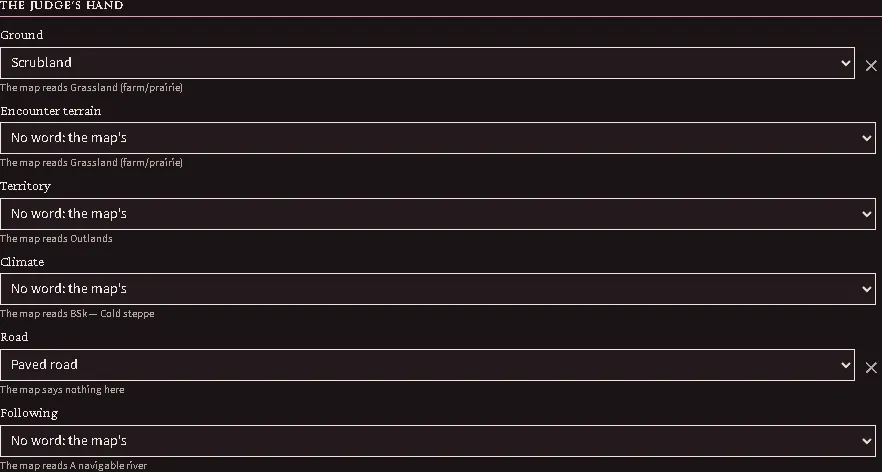
The Judge’s hand: a ground and a road given, each with its clear, and under every select what the map reads there.
Movement, yours alone, holds Moving by — on foot, mounted, by vehicle, flying, or by vessel — which decides which of everything else the party actually meets. A flier ignores roads entirely; a vessel ignores the ground, and over a river or a coast it draws its encounters from the river’s table. The Sky section is the day’s weather; the Day section is one kind of day (a dedicated march, a forced march, or a day in camp), the ancillary hours you give to travel, foraging, hunting, searching or rest (how many a day kind leaves you is an imported figure), and the hour’s own word, the world clock’s or yours. An hour given to travel adds an hour to the day’s march. The Day section also takes two declarations of your own: how many traps the order managed today, and No sleep tonight.
The sky’s season is read from the world calendar where it can be: the Calendar seasons setting, in the module settings, lists the generator’s seasons in your calendar’s own order, for a calendar whose season names the module does not know; left blank, the names are matched. While the calendar answers, the Sky section’s season select shows its season and is locked.

The Calendar seasons setting and its hint.
Under the sky’s chips a list says what today’s weather does: the penalty on a search, a survey, the navigation throw and a tracker’s hours, on foraging for firewood or water, how far the party can be seen, a flier’s storm, what a night’s rest needs and the sickness a run of such days risks. Every figure is read from your own weather pages by the importer; until they are imported the list says the sky is unpriced, and nothing is charged. Each card that pays one of these penalties names the weather on its own line.
End day, at the head of the Wilderness tab, closes the day: it feeds the order, walks every body’s hunger, thirst and exposure one step, writes the miles and hours actually walked into the log, and moves the calendar to the next dawn. It owes an encounter throw for each batch of traps managed and carries the odd traps to tomorrow. Two whispered cards follow on a day that has them. The weather’s toll carries the sun’s burn, the heat’s save for a body in heavy armour, the frostbite save for a hypothermic one and the sickness throw when a run of bad days comes due; a body that fails is marked Frostbitten or Diseased, and what that does is resolved from your book (RR 277-279). The night’s rest says for each body whether the night was restful and where its fatigue stands: days of activity without a rest day, nights without restful sleep and forced marches each bring on the Fatigued condition, it deepens every day it lasts, and a day in camp with a restful night ends it.
You rarely have to notice that the day is done. Once the hours the day holds have been walked, or the party marches on after dark, moving the token asks:
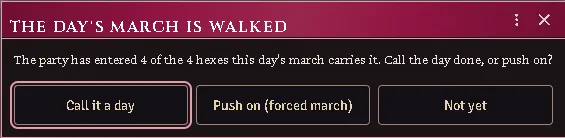
It is never answered for you — ending a day spends the provisions, settles the ground, rolls tomorrow’s sky and moves the calendar, and pushing on into a forced march is a real choice with a real price. The question is put once, and put again if pushing on bought more road. Pause, among the quick tools, stops a drag from spending anything, for when the token has to be moved and the party has not.
The camp
Section titled “The camp”The Camp section, after Day on the Wilderness tab, is what the party is living on: how many days of food and water the packs hold across everyone in the order, and who is going short. Food and water are pooled — one member’s rations feed the whole order — and dealt by a policy you choose in the module settings: evenly, so everyone goes equally short, or by triage, so as many as possible eat properly. The strip shows the days of food and water to the players too.
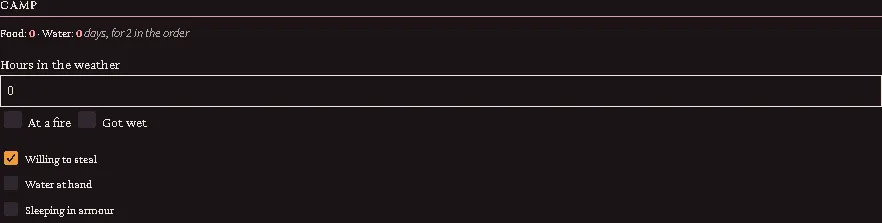
The Camp section: the days of food and water, the hours in the weather with At a fire and Got wet, and the three declarations.
Only the suffering are listed. Someone who is hungry, thirsty, hypothermic or losing Constitution appears with what it has cost them; the well-fed do not, because a full roster would bury the one who is starving.
Hours in the weather is yours to set. A marching day is not automatically a day spent unprotected, so the module does not assume one: say how long the order actually stood in it, tick At a fire if they had one, and tick Got wet if they did — a soaked body is hypothermic however well dressed. Anyone carrying a cloak or furs is sheltered. The same hours count under a burning sun and for armour worn in the heat. In mild weather the field is greyed, because there is nothing to count.
Three more declarations sit in the section. Willing to steal forages settled country without the penalty for leaving the crops alone. Water at hand takes water with no throw; following a river says so by itself. Sleeping in armour has each sleeper throw against the weight they bear, and the night’s rest card says who slept badly and how many rounds each needs to don their kit.
Work the country, at the head of the Wilderness tab, rolls whatever the day’s hours were spent on: foraging for food, water and firewood, or hunting. What is found is deposited on the people who found it, and every attempt is reported — including the ones that turned up nothing.
Search an hour, the magnifying glass among the quick tools, spends one of the day’s set-aside hours looking, runs the clock an hour, and owes an encounter throw whatever it finds. Something here, at the foot of Points of interest, is how the hour is answered: From the stock reads the hex’s own stock (below); Yes and No are your word, and the stock is left alone. Looking for narrows the search to one point the party has not yet found, or to Elsewhere — a search for something that is not there. A find with one candidate is marked found; with several, the whispered card lists them and you mark the one they came upon. A tracker in the order adds the Tracking bonus; if that figure is not imported the card says so and throws without it.
This hex
Section titled “This hex”Lairs are the map’s, not the party’s. Stock this hex rolls the hex’s lairs by the book’s own procedure from your imported tables — the terrain’s dice, the share a settled territory keeps, and the substitution of valuable, dangerous and unique terrain for some of the lairs — and draws each lair through the encounter chain, so a lair that is a monster is the monster the chain would meet. Type a count to override the roll; a terrain with no imported row asks for one. The stock is kept on the scene, under the hex, so two parties crossing the same hex find the same things and a party that never comes back leaves them where they were. The section names the world-clock day the hex was stocked, so an old stock is plain to see. Nothing restocks a hex by itself: Restock replaces the stock with its finds and its survey, and asks first.
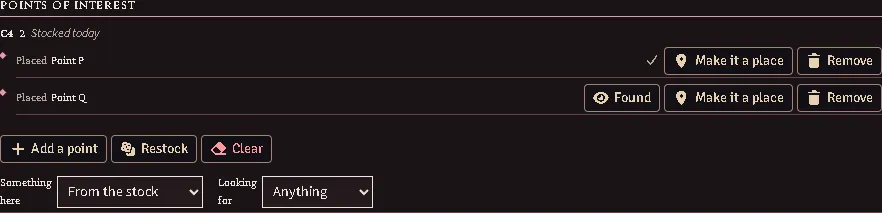
The Points of interest section: the hex, its count and the day it was stocked; each point with Found, Make it a place and Remove; and the search row beneath.
The Points of interest section of the Wilderness tab lists each point with its kind, whether this party has found it, and three buttons: Found, Make it a place (a location actor and a hidden token at the hex’s centre, revealed when the party has found it) and Remove. Once the hex is stocked, Add a point places one of your own. Survey the hex throws Land Surveying for the first member of the order who holds it; a success tells the true count, a natural 1 tells a confidently wrong one, and anything else tells nothing yet. The card shows you the truth beside what the surveyor believes, and Tell the party posts the surveyor’s count publicly in the same words either way. A surveyor also tries by themselves after each search hour until they have an assessment. Clear removes the stock.
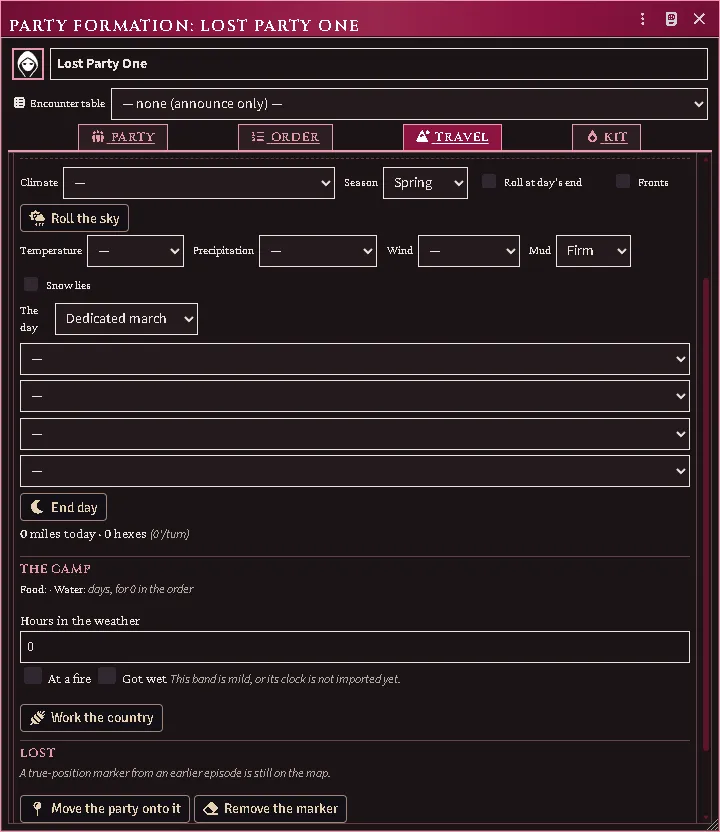
A lost party searches and surveys where it really stands — the hidden marker’s hex — not where it believes it is, and cannot make a place there until it knows.
Encounters
Section titled “Encounters”Encounter throw, the die among the quick tools on a journey, runs the whole wilderness encounter chain at once and whispers it to you as one card. The card shows every roll, the creature or find it lands on, how far off it is and the party’s chance to evade. A creature your world or your imported library holds is linked. Journey encounter throws is on by default: every encounter-table hex the party walks throws by itself — a crossing on a map drawn at the table’s own hex width, or that many miles on any other map; the strip says when the next one falls — and End day throws whatever the day owed. Day and night are read from the world clock, or from the hour you set in the Day section.
When the throw lands on a terrain encounter, the card also rolls what that result leads to. Each table it names is rolled on its own die, and the terrain’s treasure type or ruin modifier is read from the terrain the throw drew on, so the whole find is on one card. A result that hands off — a double, a monster, an either-or, a despoiling — is drawn through the chain and shown indented beneath it. A result the module does not follow, or a table your import lacks, tells you to draw from your book.
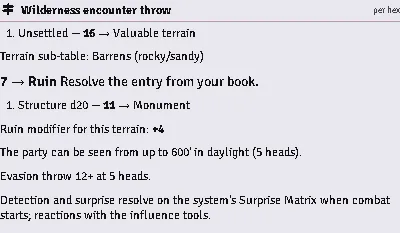
A terrain encounter’s card: the result, each table it led to with its die and roll, and the terrain’s modifier.
The navigation throw
Section titled “The navigation throw”Off the road a party can lose its way, and the day’s first step away from one decides it. The first time in a day that the party token is dragged off a road, or you press Next hex there, the navigation throw is made for the order and whispered to you; a player’s drag sets it off, and the player sees nothing of it. A day, for the throw, ends when the calendar’s day changes or when you press End day, whichever comes first, so a clock that keeps no calendar still counts its days and a march that runs past midnight owes the new day’s throw at its next step off the road. A day spent on a road, along a navigable river or on a route you have said the party knows owes no throw, and End day makes none.
The throw is made against your imported figure for the ground the party believes it is crossing, with what your import says the order’s Navigation and Pathfinding are worth; the card shows the throw, its target and the weather that weighed on it.
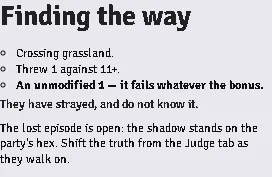
The throw’s card, whispered to the Judge: the ground, the throw against its target, the verdict, and the episode it opened.
Navigation, quietly, on the Judge tab, says where the day stands: owed at the day’s first step off the road, thrown today, or nothing owed while the party follows a road or a route. Beneath it are the last ten throws, newest first: the day, the hex, the throw against its target, and whether the party kept its way. Throw now makes the throw by hand, for one the march does not make for you, and counts as the day’s.

Navigation, quietly: where the day stands, Throw now, and the last throws with their day, hex, throw against its target and verdict.
Getting lost
Section titled “Getting lost”A failed navigation throw opens the episode at once, whispered to you and not announced. A hidden marker, the party’s true position, appears under the party token, and from then on the two are told apart. The party token is where the party believes it is, and the map fills in for the players with the ground they think they crossed. The marker is where they really are, and only you see it; on a hex map every drag moves it by the same steps, hex for hex, from wherever it stands. An episode opens only while you are viewing the party’s scene. When you are not, the card says so and offers Begin the lost episode, which opens it once you are viewing the scene with nothing asked: the marker starts under the party token, and the truth is yours to shift from the Judge tab as they walk on. They strayed… on the Judge tab opens an episode on your own word, and asks for the face they wandered off by or rolls it.
What happens to a lost party happens where it really is. Its encounters are thrown for the marker’s hex, by that hex’s table and at its cadence, and it searches and surveys there (see This hex). What the players see is drawn where they believe they are.

A lost party’s Country section on the Judge’s seat: the cards read the believed hex, and the encounters line names the table of the hex they really stand in.
Where they are, on the Judge tab, shows both. The True plate is the marker’s hex and the Believed plate the party token’s; while they differ, the believed plate is dashed and gold, and a badge names the direction the truth lies in. Shift the truth moves the marker one hex toward any of the six directions, or toward a face rolled blind from the middle cell, and the players see nothing move: it is how the party comes to stand somewhere other than where it believes.
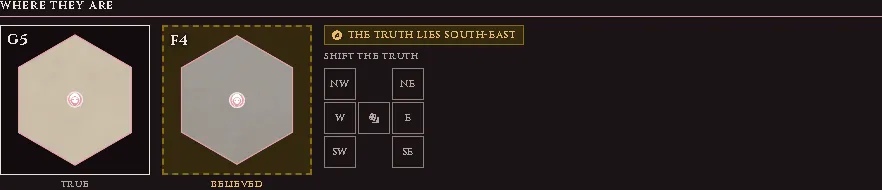
Where they are: the True and Believed plates, the badge naming where the truth lies, and the Shift the truth pad.
What the party is shown, on the same tab, decides what the players’ sheet says of their position. The believed hex, the default, draws and reads the hex the party token stands in. Unknown country blanks it: the players’ picture is an empty frame, no hex is named, and the Country section says Unknown country and nothing more. Your own sheet shows the same under a gold line, and the section previews a player’s sheet beside the choice. Encounters are thrown as before either way.
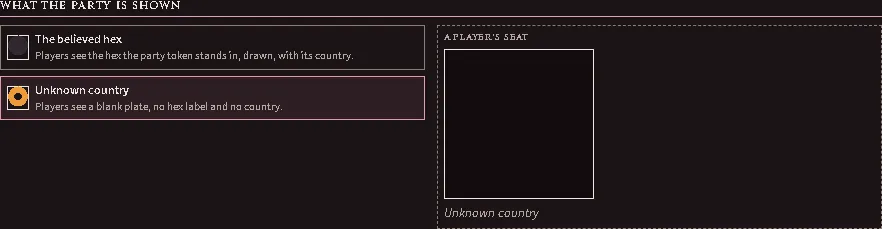
What the party is shown, with Unknown country chosen, and the preview of a player’s seat beside it.
Each later day’s throw is still made, and none of them ends anything by itself: a success while they are astray offers They realise they are lost on its card. When they realise it — that press, or They realise on the Judge tab because you told them — the imagined ground closes back over and the players are told, in as many words, that the last few days were not where they thought. They do not learn where they actually went. Finding their way back to a known landmark is what puts the country they really crossed onto the map, in its right place.

The episode once they know it: the days since they strayed, the two ways out, and the field for where they actually are.
From then on the Judge’s tab offers the two ways out. They find the landmark credits the ground they really crossed, and can step the party token onto its true position. They turn back closes the episode and credits nothing. A marker left behind by an earlier version is named on the same tab, with Move the party onto it and Remove the marker.
If a player’s map lost ground they had explored after a lost episode or an anchored map on an earlier version, view that scene and run Merge Fog Copies on This Scene (GM) from the macro compendium. The ground was still stored, in an older copy of the player’s fog that their map no longer showed. The macro folds every older copy into the one the map shows and says how many it merged. It refuses while a party on that scene is lost and does not know it yet.

The macro’s report after folding one older copy into a player’s current fog.
In the city
Section titled “In the city”In the city, picked in the mode selector in the title bar, swaps the journey board for the City tab. Under The city on that tab, choose a pace, whether the party is on the avenues or in the alleys, how well it knows the way, and the hour, which reads the world clock unless you override it. The lines beneath say what the board has worked out: what the clock reads, how far a turn carries the party, which quarter it stands in and which list the next incident is read from.
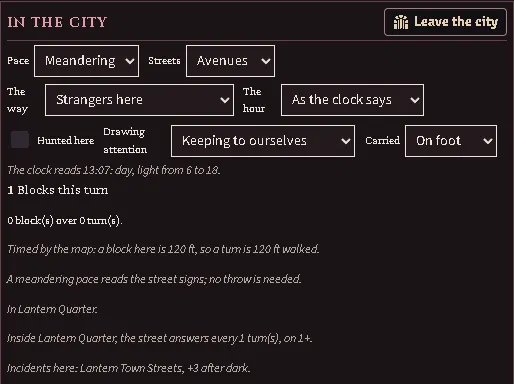
A city is walked across, not clicked through. Move the party’s token and turns are marked off exactly as they are in a dungeon — so a turn in the streets costs a torch, a spell’s duration and the rest interval, the same as a turn in a corridor. Each turn covers the party’s blocks, tests its way if the pace and the route call for it, and gives the street its own chance at them.
How far a turn carries the party depends on how big a block is on your map, and only your map can say: set it in Scene Configuration → A block is on a scene set up as a settlement. Leave it blank and the party is timed by its walking speed instead; the panel says which of the two is in force.
Being lost in a city is a wrong turning the party notices at once — a short detour, not an episode. A large party straggles and moves slower; splitting it is the way out, at the price of each group answering for its own encounters.
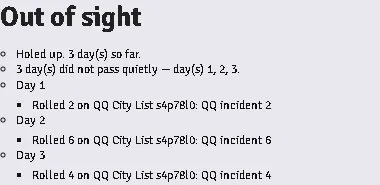
Somewhere the party is holed up is the one place its own movement cannot report, so a stay is counted off the calendar: advance world time however you like and each whole day is thrown for once. A day that does not pass quietly draws what found the party through the lists a street turn reads (the hunted list, the quarter’s, the zone’s, the map’s city list, then the world’s table), and the stay card lists it under that day’s own Day row. Nothing is marked on the map and the card offers no Make it a place: the party was indoors.
Streets, and quarters
Section titled “Streets, and quarters”Draw the streets as walls and the city measures itself along them. The road tools are on the battlemap control, and each is a preset: pressing one arms core’s wall tool and hands it to you, so the next wall you draw is that road. Alley is a modifier on whichever surface is armed rather than a road of its own — a paved alley and an earthen one are both alleys. For walls that already exist the Walls control carries a single tool, which marks everything selected as a road of the kind a city scene defaults to. In settlement mode a move is then measured over the streets rather than across the blocks between them, so a party that follows a curving avenue pays for the avenue. The panel says which way the last move was measured. A map with no streets drawn behaves exactly as it did before — the straight line answers, as it always has.
Either way the wall’s own sheet gains a road row, and that is where the surface, the street kind and the street’s name are changed afterwards — it is the only place an avenue already drawn becomes an alley. Nothing else about the wall is touched: a street declared along the front of a building leaves the building standing.
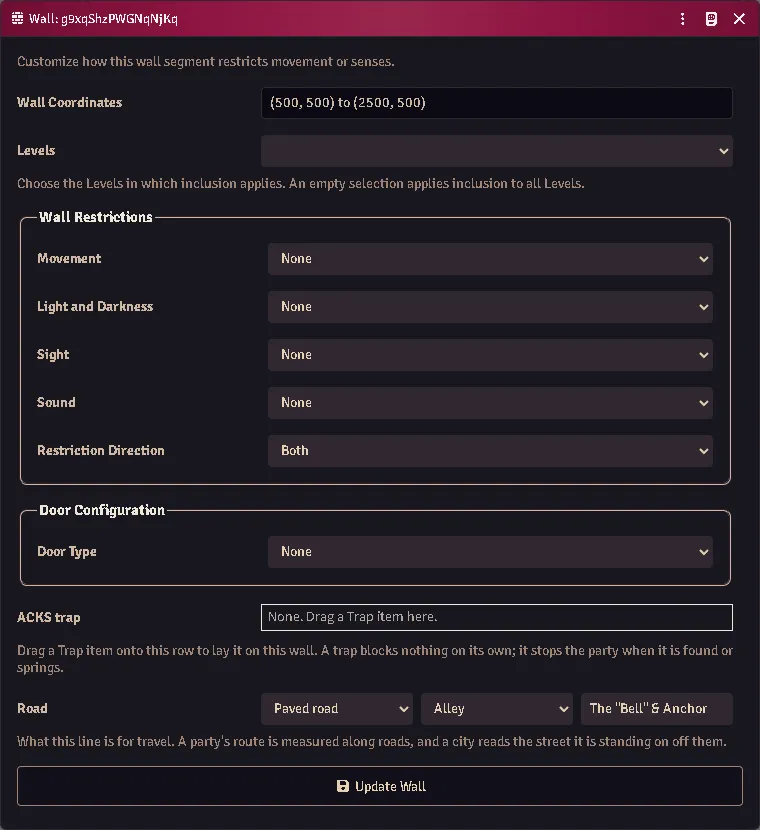
Where the party is standing is read off the map, not off the picker: a Judge who drew an alley does not also have to remember to say so on the panel. The one thing no street overrules is holed up — a party inside is not out on the street its walls happen to sit on.
A quarter that keeps its own time is a district. Draw a Region over part of the city and press the district tool on the Regions control, or select a closed loop of walls and press the one on the Walls control. Either way the Region gains a District behaviour and its sheet opens:
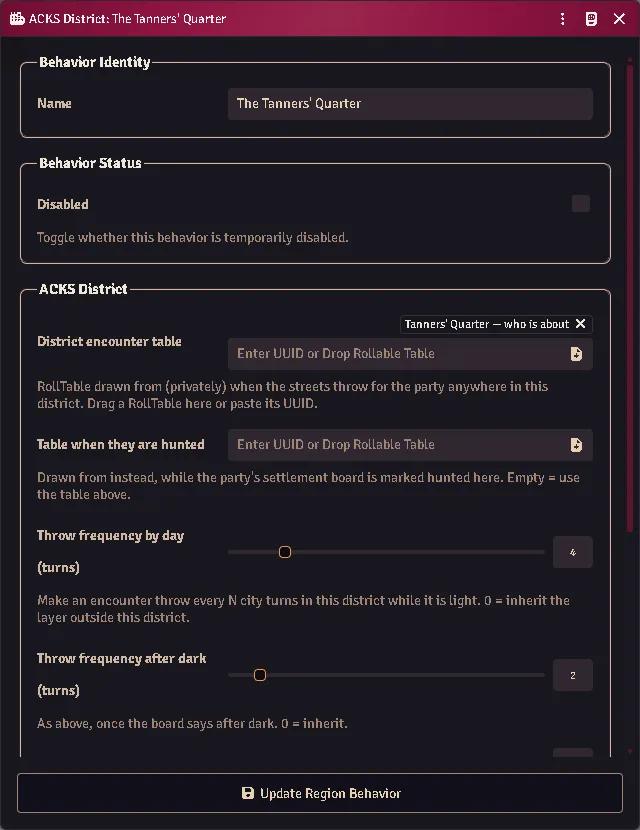
Every box is optional, and a zero means “inherit” — the layer outside the district answers for anything the district leaves alone. That is what makes it safe to price only what is distinctive: a quarter that is dangerous only after dark fills in the two night boxes and leaves the day pair at zero. A district with every box at zero changes nothing at all.
The table is who is about in this quarter, and the second one is who is about when the party is hunted here — the toggle at the head of the City tab. Being hunted belongs to the city the party is in: leave and come back and it is gone, while the pace, the place, the route and the hour you set are kept.
The hour follows the world clock. Whether it is dark picks the quarter’s day pair or its night pair and whether the city’s list adds its after-dark figure, and the panel reads that off the calendar: the line under the pickers says what the clock reads and whether that counts as day or night. Where dark begins and ends are two module settings, The hour it gets light and The hour it gets dark; left blank they stand at a quarter and three quarters of the calendar’s day. The hour picker is your override — By day or After dark for a table that does not keep the clock, or a scene you are narrating out of it — and while it is set the line still says what the clock reads, so a board left on After dark through a morning is visible. As the clock says hands it back.
The board says what all of this has come to:
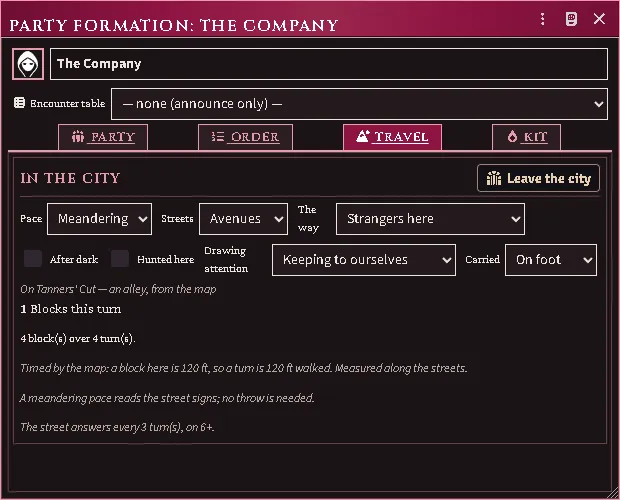
Streets still reads Avenues while the line under the pickers says the party is in an alley — the map has answered, and the board states that rather than quietly disagreeing with the picker. The last line is the quarter’s cadence with each half attributed: the interval is the district’s and the target is the street’s, because the district left that box at zero and inherited it.
Reaction adjustment is what the quarter thinks of strangers, and it is signed: a negative figure for a quarter that meets outsiders coldly, a positive one for a quarter that is glad to see them. Where it applies narrows it to the alleys, the avenues, or indoors, because a gazetteer usually says the unwelcome happens somewhere in particular. When it is owed, the influence roller shows it as its own row, naming the district — you can see what is being applied and why, not just a total that moved.
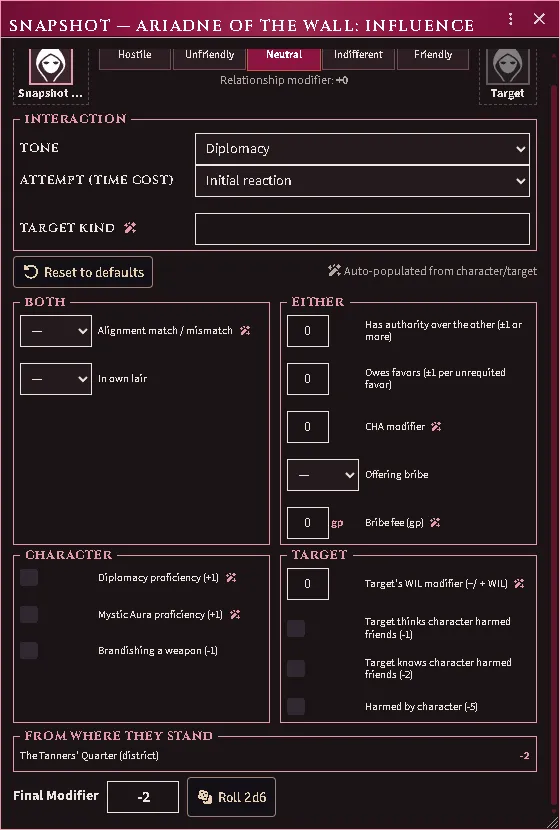
The row sits under From where they stand, apart from the boxes the roller’s own questions fill in, and it cannot be typed over: it is a fact about the ground, not an answer anyone gave. A throw that a quarter’s reception has nothing to say about — a henchman’s loyalty, a monster’s morale — gets no row and no adjustment.
A zone and a district can overlap, and a district outranks a zone: it is the quarter’s own gazetteer entry, and it is the order the tables are picked in too. Press either tool twice and nothing is stacked — an existing district is opened, not duplicated.
Points of interest
Section titled “Points of interest”A place’s token is a point of interest. Drop a location actor on the city map the way you drop any actor and it arrives as a marker: its name on hover, no bars, nobody’s side, no eyes, and a house for a picture until you give it one. It cannot join a marching order and it is not counted among the map’s tenants. Stand the party beside it and the City tab says At it, with a button to open the place — and the deposit rule already knew, so a player can leave goods at the shop they are standing outside.
A quarter can have a place of its own. On a district’s sheet the Place row picks the location actor the quarter is — its market, its notes — or makes one named after the region with +. The panel then names it as the quarter’s own place whenever the party is inside the district, wherever in it they stand.
An incident leaves a marker. When the street throws something up, the card says a marker was left where it happened, and a note only you can see stands at the spot. It lasts as long as Incident markers last says, in city turns, and the calendar takes it away; set it to 0 for no markers at all. If the thing that happened turns out to be a place — the tavern, the hideout — press Make it a place on the card: name it, and a location actor appears inside the quarter’s place with the incident’s words as its notes and its token where the marker stood.
Hop, at the head of the City tab, walks the party to any place on the map for the district-travel figure the book gives — within the quarter, or into a neighbouring one — spending the turns like any other turns and moving the token for you. Two quarters neighbour each other when their regions touch. A walk the book does not price — across quarters that do not touch, from outside any quarter, or before the figures are imported — is refused with the reason, and dragging the token still works the way it always has.
Flying
Section titled “Flying”Pick Flying under Moving by and two more fields appear: how many hours aloft, out of a day of how many, and what the flier is carrying. A party that spends only part of the day in the air is priced on that share. A flier still meets the ground below it and still feels the weather — except the wind, which bites a flier by its own rule rather than the one that slows a walker, and the readout names which replaced which.
Making one
Section titled “Making one”A trap is an item. Make one on the Items tab (type Trap) and fill in what it is: its level, what springs it, whether it is crudely built, how it resolves — a saving throw, an attack throw, damage with no throw at all, or nothing the module rolls — what it deals, and whether it takes only whoever set it off or everything within reach.
Two fields are worth a word. Springs on 1d6 of is the secret trigger throw; widen it for a trap that is easy to set off and narrow it for a hard one. Attack throw is the number your own book gives for a fighter of the trap’s level — the module ships no fighter progression, so you supply the answer rather than the level.
For a pit, leave the damage blank and set the depth: the fall’s dice are filled in for you from it, and ticking Spiked adds the spikes (JJ p. 238).
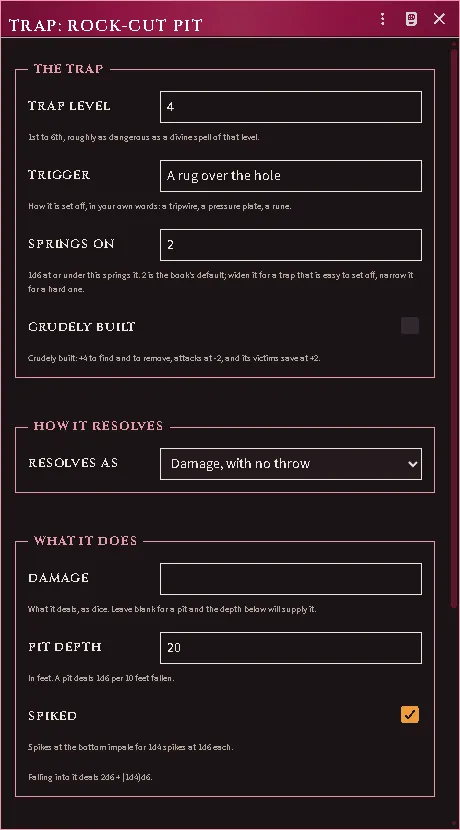
A trap item: its level and trigger band, how it resolves, and a pit’s depth deriving its own damage.
Putting one in the dungeon
Section titled “Putting one in the dungeon”Two ways, on the Walls layer:
- Trap the selected walls puts a trap layer on whatever you have selected — an ordinary wall becomes a tripwire, and a door becomes a trapped door. The wall keeps doing its own job: a trap blocks nothing.
- With nothing selected, the same button arms the pencil instead. It works like the Secret Door button beside it: press it and every wall you draw from then on is a tripwire — a wall that blocks nothing and carries a trap. The dot on the button tells you it is still armed; press any other wall type to stop. Draw as many lines as you like in one go.
- Enclose the selected walls as a trap area takes a closed loop of walls and builds the region they contain — for a pit, a collapsing ceiling, anything the party stands in rather than crosses.
Then drag a Trap item onto it: onto the wall on the map, onto the trap row on a wall’s configuration sheet, or onto the Trap field of a region’s Trap Zone behavior. Dragging onto an untrapped wall lays the layer and assigns the trap in one go.
You see a marker on each trap showing its state — armed, spotted, disarmed, spent. Players see nothing at all while a trap is hidden, the same way they see nothing of a secret door until it is found — and once the party HAS found it, sprung it or disarmed it, they see its marker too. That is what they point at to work on it.
A trap area is drawn for you and never for them, whichever scene layer they open.
Working a trap from its marker
Section titled “Working a trap from its marker”While you are on the Walls or Regions controls, a trap’s marker is a control, and it takes the same two gestures a door does:
- Left-click sets the trap, or makes it safe. An armed trap goes safe; a safe one arms again. A trap that has already gone off is rebuilt — armed again and a fresh secret, with nobody’s failed attempts held against it.
- Right-click decides whether the party can see it. A ring round the marker means they can. Use it when they learn about a trap some other way — a warning, a map, a captive — or to put one back out of sight.
- Hover it to read which trap it is, what state it is in, and who can see it.
Neither gesture rolls anything: they are you moving the mechanism. A character working on a trap is Trapbreaking, below.
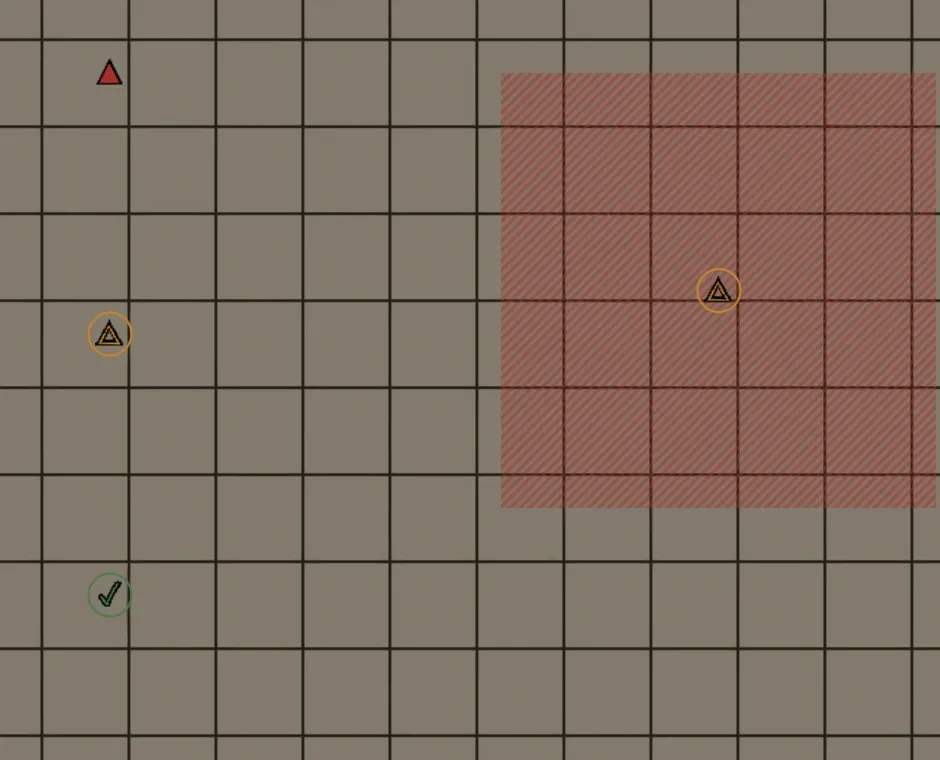
Four traps as the Judge sees them: an armed one still secret (no ring), a spotted one and a disarmed one the party knows about (ringed), and a trap area whose marker sits at its middle.
Markers are still drawn on every other layer, but they stop answering the mouse there — so a trap can never be disarmed by a stray click while you are dragging tokens. Players can never work one from the map at all.
What happens when the party walks in
Section titled “What happens when the party walks in”All of it is whispered to you, including the times nothing happened. A player’s chat shows none of it, not even a line saying dice were rolled.
There is nothing to press. Trap resolution fires on its own the moment the party token moves, with no prompt and no button — you are never asked to confirm a throw, and the table is never shown one. Two things it needs, though, because neither announces itself when it is missing:
- The party has to move as the party. Traps resolve for the party token, so a session that moves each character’s own token individually gets no trap throws at all. Add them to the party first.
- A Judge has to be connected. The automation runs on the GM’s client, so a party moving in a world with no GM present crosses everything untouched.
Anyone who can search throws first — and not only against the trap in the way. A thief moving at exploration speed throws against every hidden trap the party passes within 5’ of, 10’ with a pole, measured against the ground they actually walked rather than where they stopped. You hear about it only when something is spotted; the misses are silent, or the log would be unreadable. Each character gets one throw per trap per level, which is what a hasty search costs them.
A thief at the front who makes it spots the trap before anyone touches it. Then the 10’ pole probes a square ahead of its bearer, then the party itself, rank by rank, each on its own secret 1d6. The first throw that comes up inside the trigger band springs it, and the party stops there rather than walking on.
At combat speed there is no pole and no searching — the party is moving too fast for either, exactly as the book says.
Damage is rolled and reported, not applied — the card gives you the number and the sheets stay yours. The number is already worked out against the throw: a missed attack deals nothing, and a made save takes off whatever that trap says it takes off (half, all of it, or nothing at all if the save only buys you a choice about where you land).
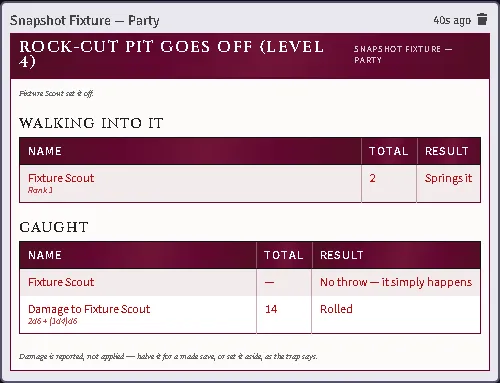
The whispered card: who walked in, who sprang it on the secret 1d6, who was caught, and what it dealt.
Getting past one
Section titled “Getting past one”Press Trapbreaking at the head of the party sheet’s Order tab. It asks the three questions the book asks — who is working on it, which trap, and by which column of the table — and shows you the throw before anyone spends the round or the turn.
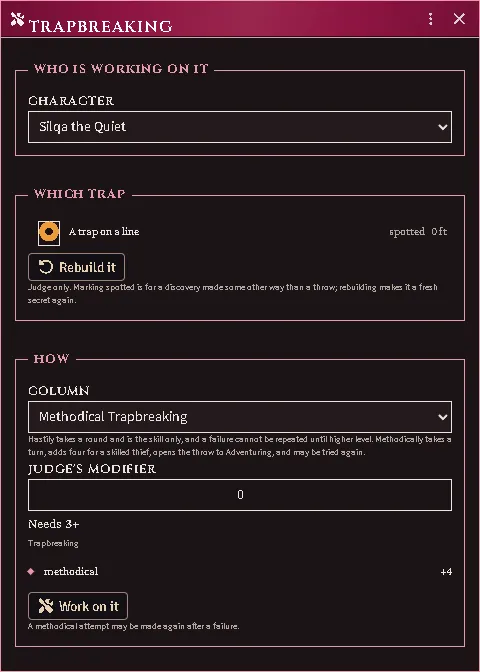
The target is picked, never guessed: a party halted in a corridor can be standing at more than one trap. The list holds only traps the party has found — offering an unfound one would give it away — and you get a control to mark one spotted when they found it some other way than a throw.
Players see the same dialog whenever one of their characters could actually make the throw, and their attempt is declared to you the way every other party action is.
A character with thieves’ tools can work on a trap the party is standing at:
- Hastily — one round, and the Trapbreaking skill only. A low enough unmodified roll sets it off, and the module refuses that character another hasty try at this trap until they gain a level (RR p. 267).
- Methodically — one full turn. A skilled thief adds the methodical bonus; a non-thief may try through Adventuring. It is harder to set off than a hasty try, and a plain failure can be tried again (RR p. 267).
Beat it and you choose: disarm it, which leaves it re-armable, or discharge it deliberately, which spends it. A disarmed trap can be re-armed later on a Trapbreaking throw.
A crude trap is easier to find, to remove and to save against, and attacks at a penalty (JJ p. 238).
A door on the map opens its own window: what it is built of, how many spikes are in it, and the three things a party does to one that will not open. The construction and the Judge’s two marks, Evil and Lock jammed, are written to the door the moment they are set, for the Judge’s record and for anything that reads the door’s state; the marks change no figure in the window.
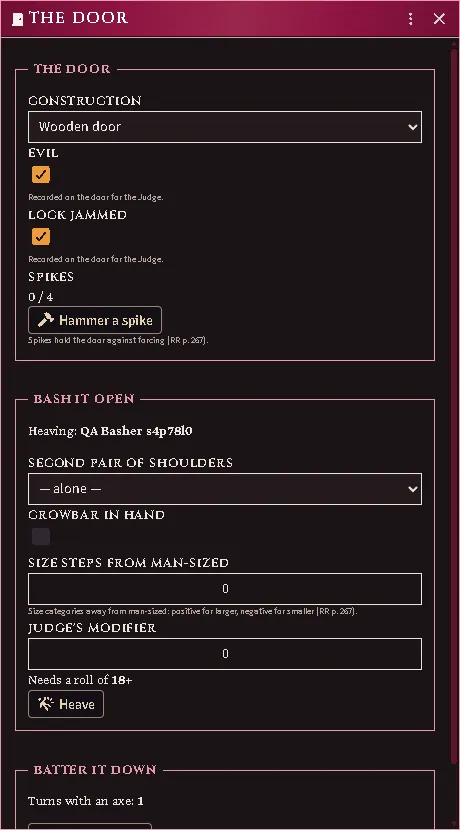
Two spikes hammered in, the heave broken into its parts — Strength against the spikes, and the number it needs — and what battering it down with an axe would cost in turns.
- Spikes go in one per round, up to the most a door holds, and every spike after the first makes forcing it harder (RR p. 267). Pulling one back out is its own control.
- Bash it open is the throw, itemized before you take it: who is heaving, whether a second pair of shoulders is on it, a crowbar, how far from man-sized the heaver is, and the Judge’s own modifier. The number it needs is shown, and so is every part of what you have. A botched heave rebounds on the heaver: the card carries the damage line, reported and not applied, as a trap’s card does.
- Batter it down is the slow certainty instead — the window says how many turns an axe wants for that construction, and a construction an axe cannot beat says so where the button would be. The turns are charged to the clock of the formation holding the basher, and the notice names them; a basher no formation holds spends nothing.
Dealing out experience
Section titled “Dealing out experience”Deal XP divides an adventure’s total between the party and shows the division before it is given. It is the star among the party sheet’s quick tools, and only a GM sees it. While the setting Deal experience from the formation is on, the system party sheet’s own Deal XP button is hidden, so this is the one to use; turn the setting off to go back to the system’s division.
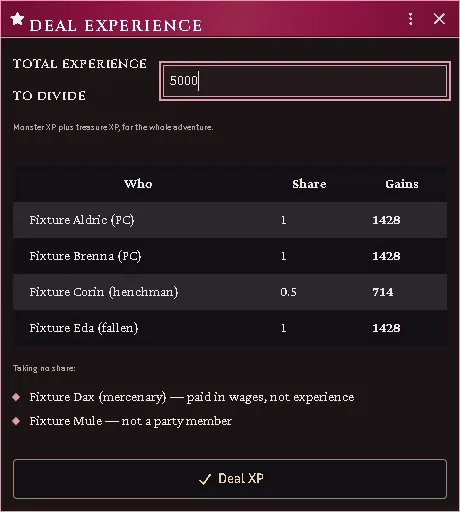
Full shares to the player characters, a henchman at the share their terms set, and the two taking nothing named with the reason.
Everyone’s share is listed with what they will gain, and anyone taking nothing is listed too, with why — a mercenary is paid in wages rather than experience, a pack mule is not a party member. A fallen member still takes their share. Only Deal XP writes anything.
Whether a hireling is a henchman, a mercenary or a specialist is read from the Category on the hireling’s own sheet, including for a hireling added on the system sheet rather than hired through a market. Change it there and Deal XP follows.
Hit points for the whole party
Section titled “Hit points for the whole party”Hit points, the first of the party sheet’s figures, opens one window that lists every member, and applies damage, healing or a new value to all of them at once. Only a GM can press it; a player’s copy reads how many are hurt. The same window opens on the selected tokens from the Adjust hit points button in the Tokens controls, and from the Adjust Hit Points (GM) macro.
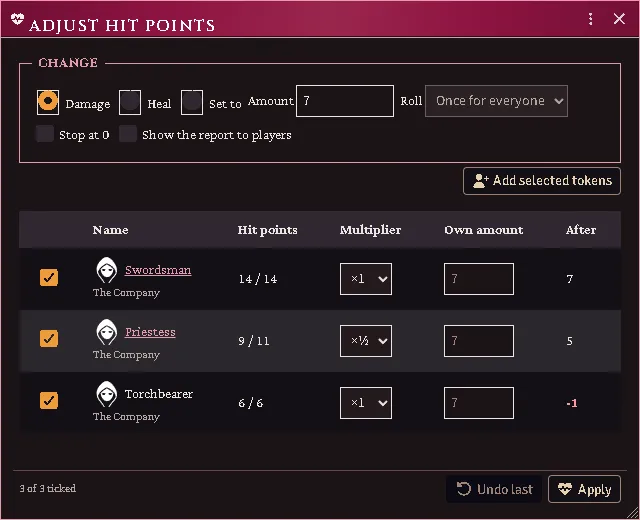
A party’s members about to take 7 damage, one of them at half, each row showing where it will land.
Choose Damage, Heal or Set to, and type an amount: a number, or
dice such as 2d6, rolled once for everyone or once for each. Each row has its
own multiplier, for a member who takes half or double, and can take an amount of
its own instead. The After column shows where each row will land whenever
the amount is a number. Stop at 0 keeps damage from taking anyone below 0.
The window writes through the system’s own damage rule, so each result is what the system would store for the same damage. The report goes to the GMs alone unless you tick Show the report to players. Undo last puts the last change back while the window stays open. A character the change takes to 0 or below gets a Mortal Wounds button beside their result.
A hireling or monster whose token is not linked to its actor keeps its own hit points on that token, and the party sheet counts them down by those, inside the party token or out of it. They keep those hit points when they step out of the party token, where the system would otherwise roll a monster new ones.
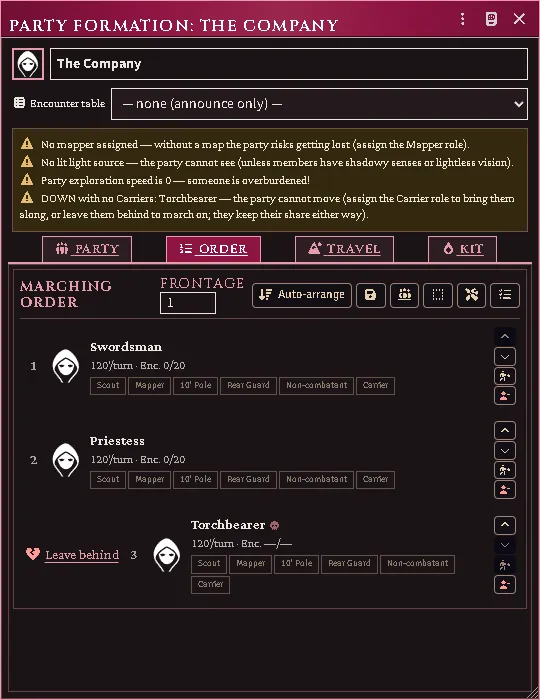
A torchbearer whose token is not linked, down inside the party token: the Order tab offers to leave them, and the column waits for a carrier.
A group is listed as its bodies on the map. With none on the map it is listed and left out, and so is a vehicle, which is adjusted on its own sheet.
The clock
Section titled “The clock”Moving the party token advances the exploration clock in turns. Torches burn down, spell durations tick, and the rest cycle tracks when the party is due one.
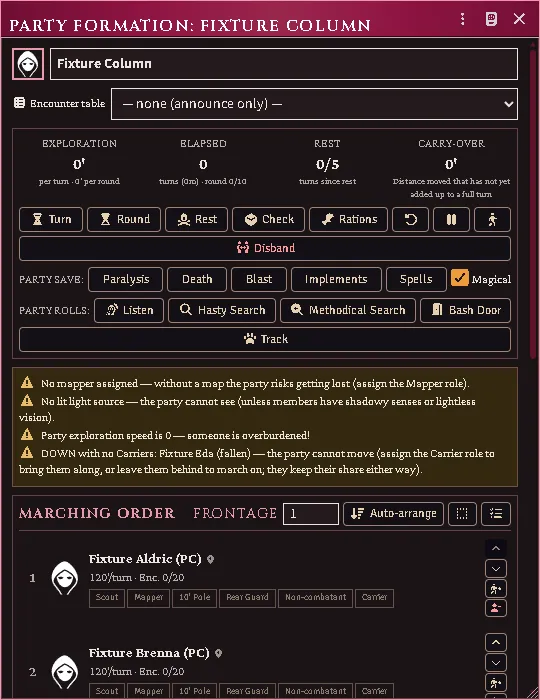
The exploration warnings, including a fallen member the party must carry or leave before it can move.
Light is real: a lit torch occupies a hand, lights the party token, and goes out when it burns through.
Wandering monsters
Section titled “Wandering monsters”The clock also makes the wandering-monster throw and, on an encounter, draws from a table only you see. To set the table, how often the throw comes and what it needs for one part of a map, draw a Region there and give it an Encounter Zone behavior. Everywhere else, the formation’s own table and the module settings apply.
A monster met off its own floor can be adjusted (JJ p. 36). Give the zone its Dungeon level, and give the table the Monster level it is written for: open the table, switch it to edit, fill Monster level on its Summary tab, and Save. When a monster comes from a table whose level differs from the zone’s, a second card gives you the adjustment and rolls the reaction. If a table’s results are other tables, set the level on the tables that name the monsters. Nothing is adjusted while either level is blank, and a draw from the formation’s own table never is, because it has no zone. A table in a locked compendium opens read-only: import it into the world, or unlock the pack, to set its level.
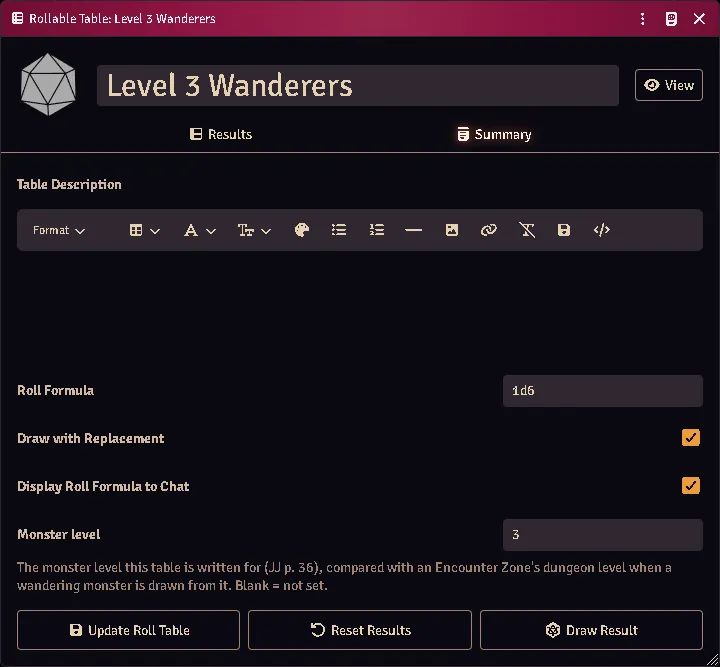
A table’s Summary tab in edit view, its Monster level filled in and saved.
Handing things out
Section titled “Handing things out”A player has to own a torch to light one, and a free hand to hold it. You do not. When a Judge gives a member a light from the party sheet, the gear appears in their pack and a hand is emptied to hold it — the shield goes on the back before the sword is sheathed, and nothing is put away that did not need to be. A lantern arrives with its flask of oil. The same applies to roles that need a kit: put someone on the map and they are handed a quill and parchment.
Nothing here blocks you. If the world has no such item to copy, or the character’s hands are full of lit torches — which sheathing cannot fix — you get told, and it happens anyway.
Mapping takes both hands. The quill is in one and the parchment in the other for as long as the role is held, which is why a mapper cannot also have a weapon drawn. Set the role down and the hands come back.
Seeing in the dark
Section titled “Seeing in the dark”Every token’s vision now comes from its own sheet, whether or not it is in a party. Ordinary eyes see only what a light source reveals — walk a torchless character into a black corridor and they see nothing, which is the rule. A character with lightless vision (or infravision) sees its recorded range, and a thief’s shadowy senses reach 30’; both see as dim light — colourless, no reading, no fine detail.
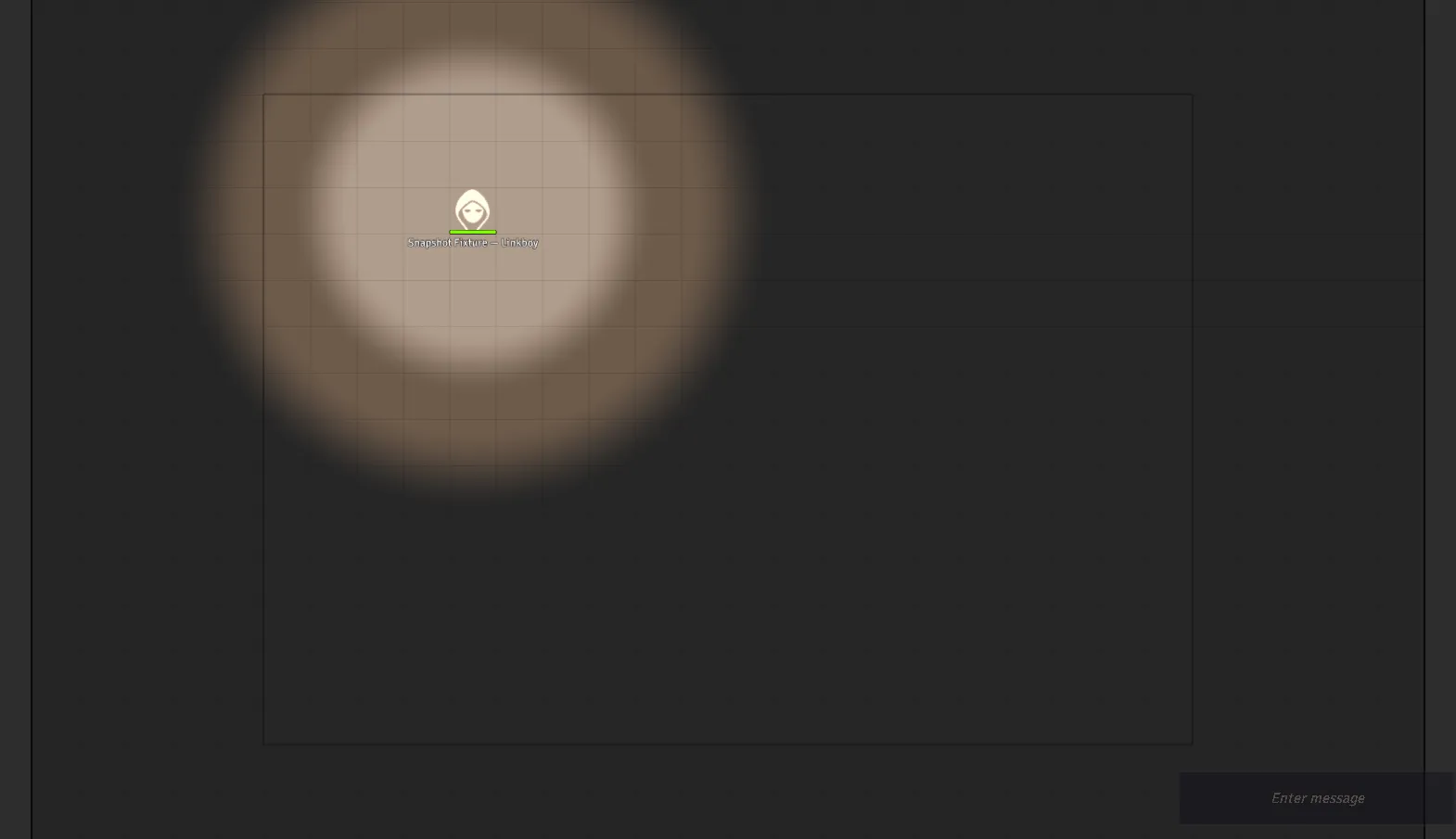
A token under its own lantern’s glow, and nothing beyond it. Nobody typed these radii — they come off the lamp and the character’s own senses.
Night vision works differently from either, because it is not sight without light — it is sight that makes more of the light there is. It brightens dim light to daylight, and indoors it carries twice as far as the light it is seeing by: a creature standing in a torch’s 15’ bright radius sees 30’. It does not need to be its torch — the party’s lamp will do, which is exactly the creature watching you from beyond the edge of your own light. In a corridor with nothing burning at all there is nothing to double, and a night-eyed creature is as blind as you are.
So if you want a monster to see indoors and it has no lightless vision, you do not need to give it any: put Night Vision on its stat block and make sure something nearby is lit. If you want it to see in pitch dark, that is lightless vision, and it is a different line on the sheet.
Monsters answer from their Full Monster Sheet stat block, so a creature with lightless vision or echolocation gets it without you configuring anything. The member list shows each character’s dark-sight range beside their speed.
Each sense behaves like itself, not like eyes. That is the part worth knowing at the table:
| Sense | Finds an invisible creature | Works in magical darkness | Reaches through walls | Stopped by |
|---|---|---|---|---|
| Lightless vision | no | no | no | blindness; a hiding character proficient in Hiding |
| Shadowy senses | yes | no | no | deafness, silence, running |
| Echolocation | yes | yes | no | deafness, silence |
| Mechanoreception (terrestrial) | yes | yes | yes — but only creatures that move | — |
| Mechanoreception (other) | yes | yes | no | — |
So a bat still hunts you inside a darkness spell, and going invisible does not help; a thief creeping on shadowy senses goes blind the moment they break into a run; and a burrowing horror feels you through the floor only while you are moving.
Two of those need a switch Foundry does not ship, so this module adds them to the token HUD: Hiding and Running. Neither is guessed — toggle them when the character declares it.
If you want a token to see differently, edit its vision by hand — from then on that token is yours and the module leaves it alone. The world setting Token vision from ACKS senses turns the whole thing off.
Bringing old scenes up to date
Section titled “Bringing old scenes up to date”Tokens are re-derived when you open their scene or change the creature’s sheet, so a campaign already under way has scenes carrying whatever their tokens were last set to. Opening a scene is enough to bring that scene up to date.
To do every scene at once without opening them, run the sweep from a script macro of your own:
const report = await acksExtras.lib.vision.migrateWorld();ui.notifications.info(`${report.written} of ${report.tokens} tokens rewritten on ${report.scenes} scenes.`);It walks every scene in the world and re-derives every token from its sheet. The call says nothing by itself, so the second line prints what it did. A count of 0 of 0 in a world that has tokens means it did not run: either Token vision from ACKS senses is off, or more than one GM is connected and the sweep is another’s to run.
Tokens you edited by hand are normally left alone forever — that is the
override working. Call migrateWorld({ reclaim: true }) instead and it drops
that protection so they follow their sheets again; those edits are not
recoverable afterwards, so the default is to leave them be. Run it after
switching the setting on, or after an update that changes how a sense is read.
Sending a scout ahead
Section titled “Sending a scout ahead”The party travels as one token, but any member can detach — the arrow button in their row — and step out onto their own token. They stay in the formation: turns, rest, encounters and their place in the marching order all keep counting. What changes is that they now carry their own light and see with their own eyes, which is the entire point of scouting.
Players can detach their own character; the GM can detach anyone.
A scout can range one round’s movement ahead, then must wait for the party to catch up or pass before going further — you will see a notice when they hit the limit. This keeps the exploration clock honest: the party token is still what spends dungeon turns.
Press the button again to bring them back, with everything that happened to them while they were out. A scout who falls out there can still be brought back, to be carried. Only a member who is down cannot step out. If a fight starts, the party deploys around the scout as normal and the leash lifts for the combat.
Party checks
Section titled “Party checks”Party roll resolves the check for every member and posts one GM-whispered card, not a wall of per-member public cards: a table of who rolled, what they got, the number they needed and whether it landed, with the modifier stack under each name and anyone who could not attempt it named at the foot.
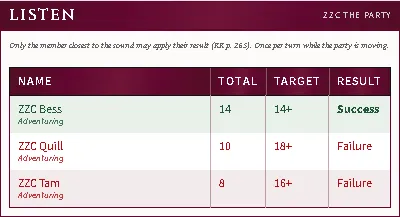
A check every member made, on one card: total, target, verdict, and the modifier stack behind each one.
Party saving throws post the same card, and so does the Surprise Matrix (below) — one shape for every roll the whole party makes at once.
Every number comes from your own imported book by way of the importer — this module ships no skill ladder. Resolution order:
- an explicit Used for binding on an ability item;
- otherwise the ladder the item itself carries, at the owner’s factored level;
- otherwise the item’s cookbook identity naming its skill.
Anything else falls back to the sheet’s roll target.
The GM can overturn what the automation decided — the card is theirs.
Surprise, on one card
Section titled “Surprise, on one card”Starting a combat opens the system’s Surprise Matrix. Pick the square that describes the encounter and the results come back as one card rather than a chat message per combatant: monsters in one table, adventurers in the other, each row naming the creature, its total and whether it was surprised.
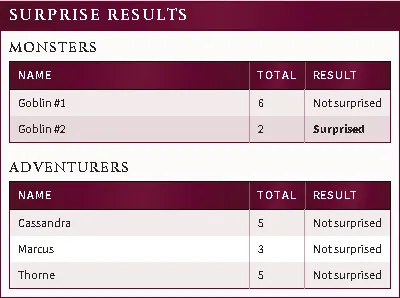
The whole encounter on one card: monsters and adventurers, each row naming the creature, its total and the verdict.
Hover a total to see the dice and every modifier behind it. The rolls are the system’s own and are not changed by this — same numbers, same threshold, same Surprised condition applied to the same creatures.
A hidden monster’s result stays private: those rows travel on a second card only the Judges can see, which is what the system already did for them one message at a time. Nothing hidden means one card; something hidden means two.
Turn Surprise results on one card off to go back to the system’s original per-combatant messages. It takes effect on the next encounter — no reload.
Initiative, on one card
Section titled “Initiative, on one card”Initiative comes back the same way: one card, one row per roll, highest first, instead of a message per combatant.
A combat group is one row. The system already rolls a single die for a group
you have made with the tracker’s people icon and gives that number to everyone
in it — but it announces the roll under one member’s name and says nothing about
the others, so a grouped fight reads exactly like a fight where everyone rolled
separately. On the card the group is a single line, labelled the way the tracker
labels it (Group 0) and naming its members underneath.
Which creatures share a roll is still yours to say, and nothing is grouped for you: select the tokens — a stack of kobolds, a summoner and everything they called up — and press the people icon in the combat tracker. Everyone else rolls as themselves and gets their own row.
A hidden combatant’s number travels on a second card only the Judges can see, as it already did. If a hidden creature is inside a group, the group’s open members stay on the public card and the hidden one appears on the Judges’ card with the same total.
Turn Initiative results on one card off for the system’s original messages. It takes effect on the next roll — no reload.
Skill audit
Section titled “Skill audit”Skill audit, at the head of the Order tab (GM), shows how every party roll resolves for every member: which item or target is used, the auto-scaled level and factor, and each bonus in the stack.
It is also the editor for custom skills: flag any ability item to take part in a party roll, scale it on a thief progression, and set a level factor (0.5 for “as a thief of half his class level”).
Common problems
Section titled “Common problems”A binding shows a skill that isn’t there. Its skill was never imported, or the import was removed. The binding still lists itself so you can see your own choice rather than a blank select — import the skill or rebind it.
The map went dark. Scene sync steps are fault-isolated, so one failure costs only itself. Check the console for which step failed.
A phantom party keeps coming back. Records whose party actor was deleted are pruned at world load. If one survives, its actor still exists somewhere.
The party crosses a wilderness map and nothing is rolled. No miles, no encounter card, no navigation card: the party is still in Delve, which counts turns and bills nothing on a map whose cells are a mile or more across (you are told so once, in a whisper). Pick Journey in the selector beside the party’s name, or set the map up as a wilderness map. The encounter card prints the party’s evasion target but does not roll it; surprise, and whether the party may evade, are settled by the system’s Surprise Matrix when combat starts.
Saves look wrong. The party does not save — rollPartySave reads each
member’s own saves.
Every feature here is free and none of it is gated. If it earns its keep at your table, you can chip in on Patreon.