
Equipment, containers and fighting styles
The character sheet’s inventory grows containers, wear locations and hand accounting. Core’s own rows are moved into place rather than rebuilt, so every control you already knew keeps working.
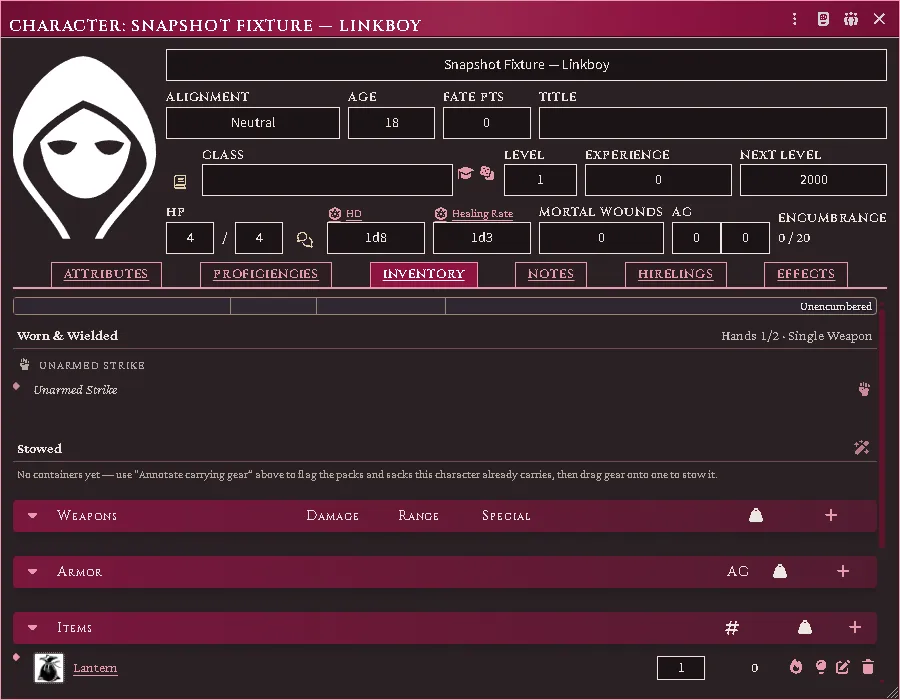
The inventory: what is worn and wielded, what is stowed, hands read 1/2 because the lit lamp is holding one of them — and the lantern’s own light controls on the row where the gear already is.
Wear and hands
Section titled “Wear and hands”Equip an item and it lands in a wear bucket — head to foot, then off-body. One taxonomy drives the buckets and the loadout summary, so they cannot disagree.
Hands are counted. A two-handed weapon needs both; a lit torch occupies one, and you cannot light one with no hand free. The controls sit in their own box beside core’s, because core’s control column is a fixed 35–60px and anything added inside it overflows.
A weapon held in both hands has no bucket of its own: it is listed under Main hand · Off hand, the two places it spans. A versatile weapon drawn alone takes the two-handed grip by itself only when the character is trained in the two-handed style; otherwise it stays in one hand until you set the grip yourself, so a default never walks you into the non-proficient package.
A two-handed grip deals the die the weapon’s type prints for that grip, with the weapon’s own modifier carried over, and the item sheet’s Rolls tab lists it as its own row. A weapon whose die you changed to one its type does not print deals its own damage in either grip.
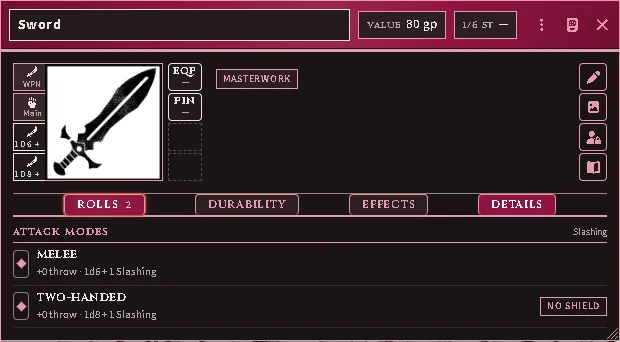
A masterwork Sword’s Rolls tab: the melee row at its own damage, and the two-handed row at the larger die with the masterwork modifier kept.
A shield counts only in trained hands. The Weapon & Shield style’s benefit is the shield’s own armour class (RR ch. 3): a character with the style gets exactly what the shield says, and Fighting Style Specialization in it adds its bonus on top. Without the style the shield is marked with an advisory and its AC is cancelled, so the figure on the sheet is the one the rules give.
Lighting a lamp from your own sheet
Section titled “Lighting a lamp from your own sheet”Every character gets light controls on the lamp itself — one to light it, and once it is burning, douse / re-light plus, on a lantern, open / close the shutter. They sit on the row where the gear already is.
You do not need to be in a party to use them. A character marching with nobody keeps their own lights, and their token lights the room for it. What it costs is the same either way: a free hand, the lamp, and a flask of oil — one of which is burnt when you strike it.
The difference is what happens next. A party’s lights belong to the marching order, which burns them down as the dungeon turns pass and warns you when one is about to go out. A light struck alone has no dungeon turn to burn against, so it stays lit until you put it out.
Players use these on their own characters: the click is declared to the Judge’s client, which checks the character is yours and carries it out, and the table sees what was declared. What a player may do is unchanged — you still need the lamp, its oil, and a hand free. A Judge clicking the same control is the Judge, so the gear and the hand are supplied rather than demanded.
Where gear is worn
Section titled “Where gear is worn”The system only lets a weapon or a suit of armour be equipped, so a cloak, a pair of gloves, a belt pouch or a backpack had nowhere to be worn. Gear now declares its own place, and every worn item that is not a weapon or armour gets a wear / take off control on its row.
Run Annotate Equipment (RAW profiles) from the module’s macro compendium and it fills this in for everything a character (or the whole world) owns:
- garments land on the body part they name — cloaks on the shoulders, boots on the feet, gloves on the hands, belts and sashes at the belt;
- carrying gear lands where it rides, with the RAW cost of reaching into it: an adventurer’s harness, belt pouch, bowcase, quiver or sheath is free to draw from, while a backpack, rucksack or sack costs an action in lieu of movement (RR pp. 293–294);
- rations, tools, rope, loot and coin declare nothing, because they are carried rather than worn — that is what keeps them plain goods.
The belt and the back take any number of different things — a belt, a pouch, a scabbard, a quiver and a harness are five forms hung from one place, and a pack rides beside a bowcase. The only wear rule ACKS II has refuses a second of the same form, so those two places are not capped.
A place counts two things, and clothing is neither. Magic items count by form — the Treasure Tome’s one of a form, with its own allowance for rings — and armour and weapons count against what the body carries once: a second helm is over, a coif under the first is not, and a magic circlet over both is fine. The badge on a place shows the larger count; hover it for both.
An adventurer’s harness secures gear by weight, not by count. Worn, it relieves you of the weight its own description states — small things and light weapons, never a heavy piece, never coin, and nothing at all over heavy armour (RR ch. 6). The figure is the book’s and travels with the item: Annotate reads it off the harness’s text into Secures on its Construction tab, and a harness that says nothing secures nothing until you type it there. The character sheet’s Load bar shows what it is forgiving as a dashed phantom past the fill, so you can see the rule working.
The slot is a guess, and you can correct it. Open any item, press the pencil, and find Worn at under Construction: every place the character sheet’s Worn rail knows, in its order, as a strip of toggles. Three readings matter:
| Reading | Means |
|---|---|
| Auto lit, some places dashed | the module inferred those places from the item’s name and type; nothing is declared yet |
| places lit solid | this is where it sits, whatever it is called. Click a place to add or drop it; the first click turns the guess into your answer |
| nothing lit | it is not worn at all, and this overrides the name, so a “Great Helm” you have ruled to be a trophy stays a trophy; Auto hands it back to the guess |
A weapon’s hand places are lit and locked: holding it is what they mean. The whole tab keeps this shape: a drop-down wherever an item takes one answer from a registered list (base type, weapon type, class, size, masterwork, condition, silver, material, shield variant, helm), a strip of toggles wherever it takes several (grips, qualities, where it is worn), and Other tags only for what no list names.
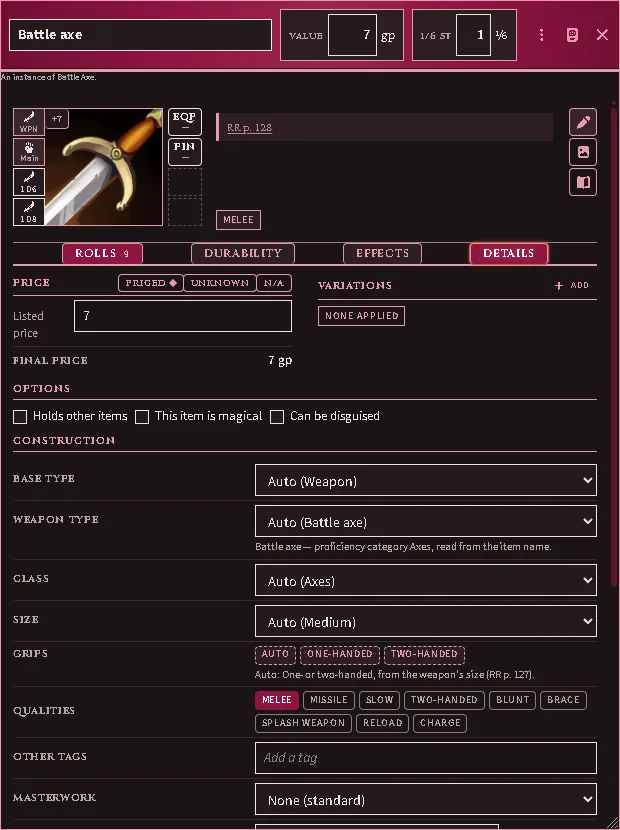
The Details tab armed: under Construction, Auto naming its guess on every drop-down, the grips dashed from the size table and Melee lit from its field, with the masterwork row beneath.
Clothing is declared once. Set Base type to Clothing under Construction and the rail beside the art shows it. The item then weighs as clothing whichever sheet, import or macro made the declaration, and the Details tab’s record has no kind of its own to disagree with it. Only an item offers clothing: core weighs every armour document as armour. An item that disagreed before this version keeps its weight until you set it; Annotate settles one the rail already calls clothing.
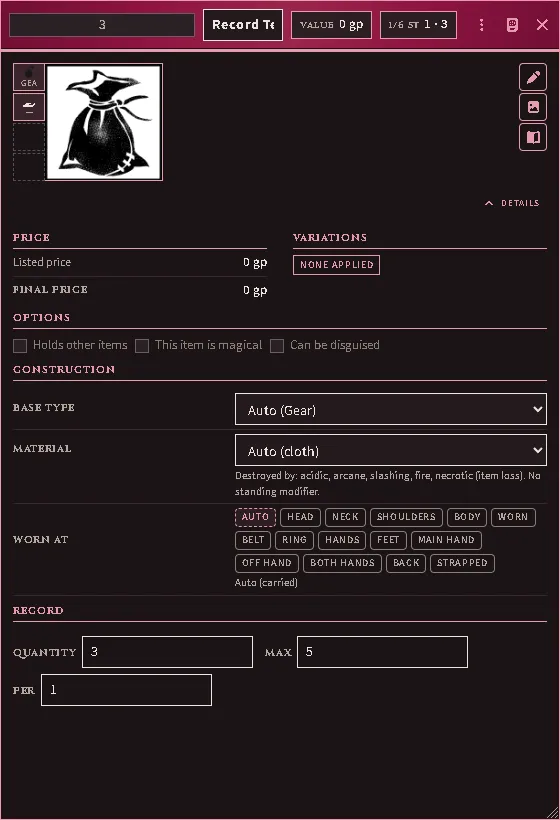
An item’s Details tab: Construction says what it is and where it is worn, and the record below it holds only the quantities.
A slot’s only rule is that you cannot wear two of the same thing, so a wrong guess costs nothing but that. Rings are the exception the Treasure Tome spells out: you benefit from two, and a third stops all of them working.
Silvered weapons
Section titled “Silvered weapons”RAW lets you commission a silver version of any common weapon for 10× its listed price, not just the Silver Dagger on the price list. Open the weapon, go to Construction, and set Silver to Silvered — the price goes up tenfold and nothing else about the weapon changes, which is exactly what the rules say happens.
| Choice | Means |
|---|---|
| Auto (…) | read it off the weapon table and the name — a Silver Dagger or a “Silvered Sword” is already silver, and costs nothing extra because you bought it that way |
| Silvered | plate this weapon now: 10× the listed price |
| Not silvered | it is not silver whatever it is called |
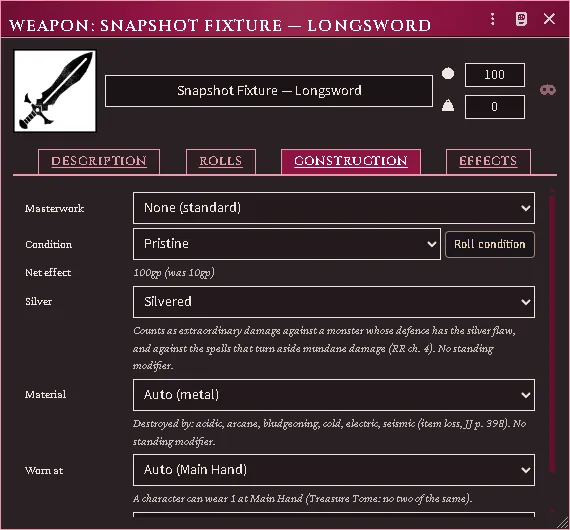
A silvered weapon’s Construction tab: the Silver control, and what the plating buys.
What silver buys is not a bonus — it is what the blade counts as. A monster whose defence has the silver flaw treats it as magic, and the spells that turn aside mundane damage do not turn it aside. Mark the flaw on the monster’s Defenses tab, beside Mundane and Extraordinary; the stat block will say “silver weapons deal extraordinary damage against it” when it applies.
Masterwork is a separate thing and does not help here: it edits the weapon’s numbers, never its ability to harm something that shrugs off ordinary weapons (RR p. 159). The sheet says so under the tier picker. On a weapon with masterwork, a condition or silver, a damage, bonus or weight you type is the figure it keeps: changing those later works from what you typed.
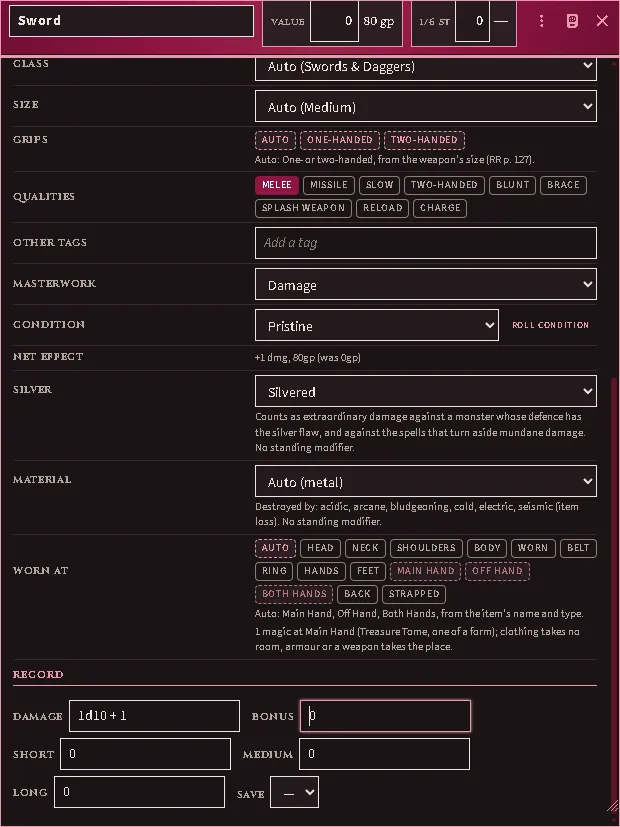
A masterwork Sword with its damage typed on the sheet, then silvered: the figure typed is the one it keeps.
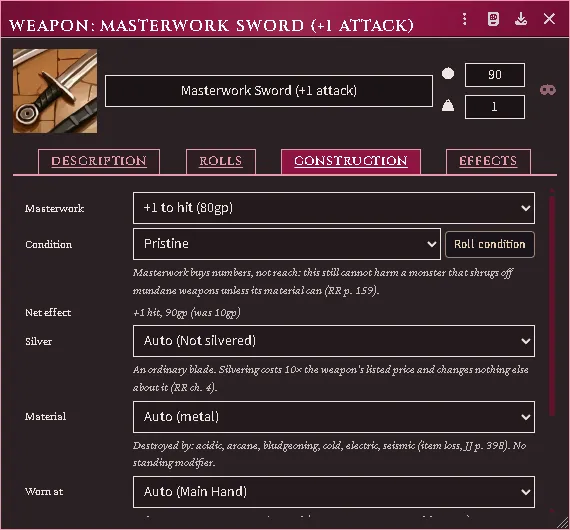
A shipped sample’s Construction tab naming the tier it is, with the net effect against its base price.
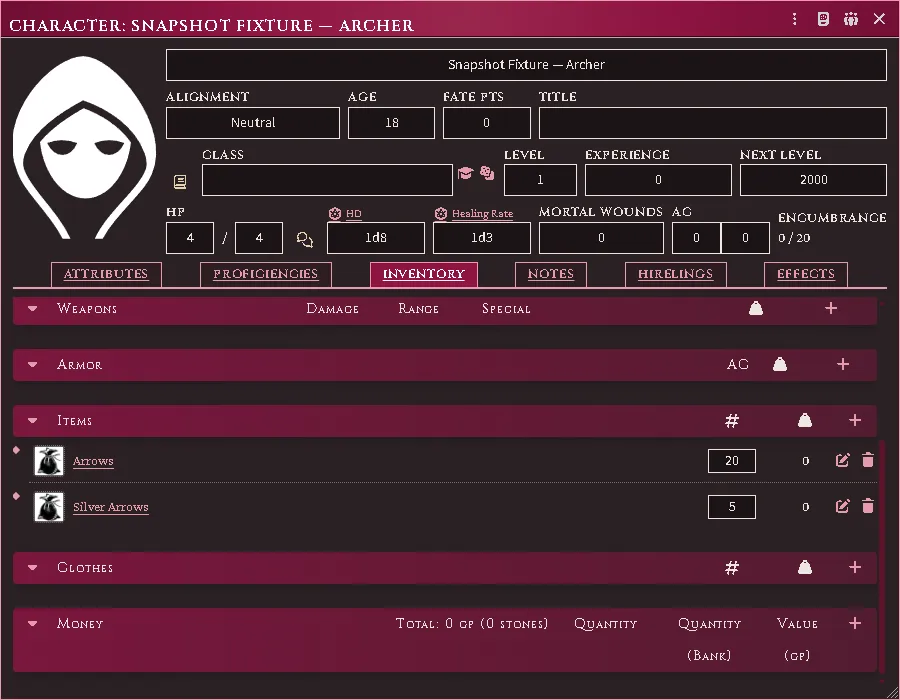
Plain and silver stacks side by side; the silver one declared for firing.
Silver arrows are never spent by accident. With both plain and silver ammunition in your pack, shots come out of the plain stack until it is empty, and when a silver round does go the notification says so. There is no way yet to declare “fire the silver ones now” — to shoot silver deliberately, keep it as the only ammunition to hand, or spend it by hand on the stack.
Containers
Section titled “Containers”New container on the equipment tab. Drop items onto its bucket to stow them.
- A container shows its own header, load, and controls next to the gear it holds — there is no separate window.
- Coins are stowable (they go in a pouch), and they weigh: a purse counts toward your load to the coin, wherever it is packed, whether the world’s roll automation is on or off.
- A container holding coin is a store a payment can draw on, and can be named as where you pay from or receive into (where coin is paid from).
- Locked and concealed containers are supported: picking a lock does not remove it, so the two states are tracked separately. Coin behind a lock you cannot open still weighs on you, and no payment reaches it.
- Emptying a container leaves its contents loose on the actor rather than deleting them.
Ammunition and thrown weapons
Section titled “Ammunition and thrown weapons”Firing a launcher decrements its matching ammo. A bundle of darts decrements likewise.
A single thrown weapon — a hand axe, a lone javelin — is not destroyed. It is marked thrown away, unequipped, and stops weighing on you until recovered. Use the Recover macro to clear the state.
There is no automatic recovery percentage, because the rules give none: recovery is the Judge’s call and thrown weapons come back by being picked up.
A quiver of arrows is arrows. “Quiver, 20 Arrows” and “Case, 20 Bolts” are sold packed, so they are the ammunition rather than something to put ammunition in — the count on the row is what you have, and it goes down as you shoot. They still ride your belt and are still free to draw from.
If a quiver in your world shows a capacity it should not have — 0 / 1 st, empty, next to a name that says twenty arrows — run Annotate carrying gear from the inventory header once. It clears the capacity and leaves the count alone, so a half-empty quiver is not refilled.
The same pass, and the Annotate Equipment (RAW profiles) macro, also settle coin: where a coin’s own description states how many make a stone and the coin carries no rate yet, that count becomes its rate. A rate already typed on the coin is left alone, and the macro’s notice counts coin apart from the rest.
Proficiency
Section titled “Proficiency”With enforcement on (the default), a character wielding a weapon with no Class-Training fighting-style item reads as non-proficient and takes the RR p. 15 package — attacks as a 0th-level fighter, no attribute bonus to attack or AC. The package is a row on the system’s own attack card, beside the system’s attribute row, so the throw’s formula and every term in it read on one card.
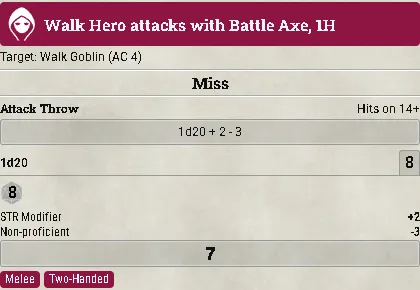
The system’s attack card for a battle axe the character is not trained in: the STR Modifier row the system adds and the Non-proficient row this module adds, summed in the formula above them.
Weapon and armour lists stay permissive when absent: no list means proficient, so an unconfigured character is not punished. It is the style that is required.
Configure a character with its Class Training items and the gate is correct. The
proficiencyEnforcement setting has auto and off if you would rather not.
What a character is trained in, at a glance
Section titled “What a character is trained in, at a glance”The Inventory tab opens with a Training row: the fighting styles, the weapon classes and the armour ladder, with every slot always showing. A slot the character is trained in lights up, and one they are specialized or focused in goes gold. A character with no class applied reads grey throughout — which says “nothing configured” rather than “not proficient”, and those are different answers.
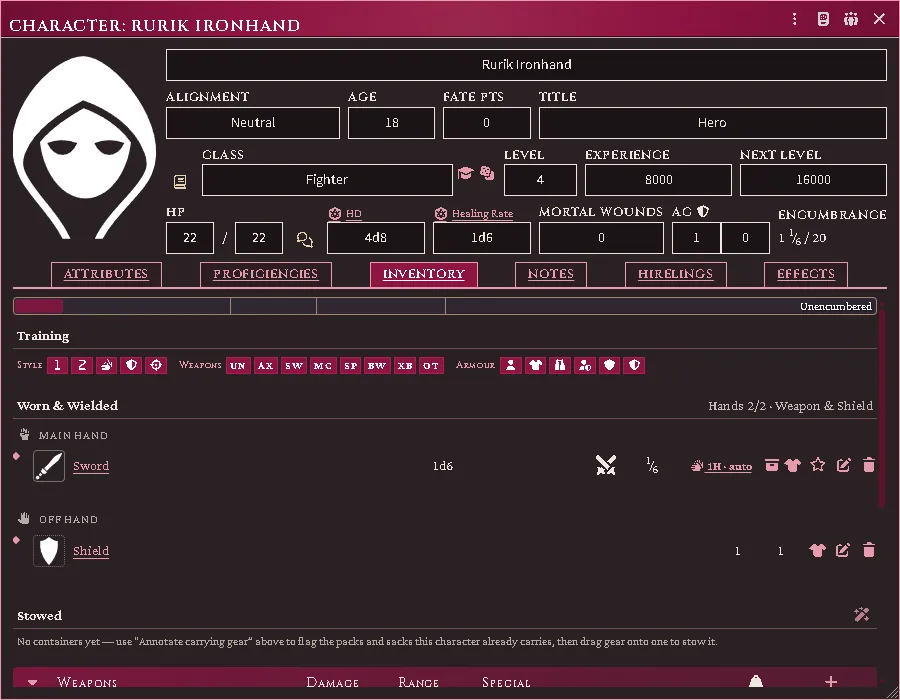
It states nothing of its own. It reads the training the class put on the character, so it is the same answer the enforcement gate above acts on — if a weapon is being refused, this row is where you see why. The same strip runs across the bottom of a follower card.
Variations
Section titled “Variations”A variation is one way an item differs from its plain self: masterwork, a silvering, a notch taken out of the edge, a stranger’s crest, a name. Each is a document, and you put it on an item the way you put a rope in a backpack — drag it onto the item, and it is listed on the item’s Construction tab under Applied variations until you take it off.
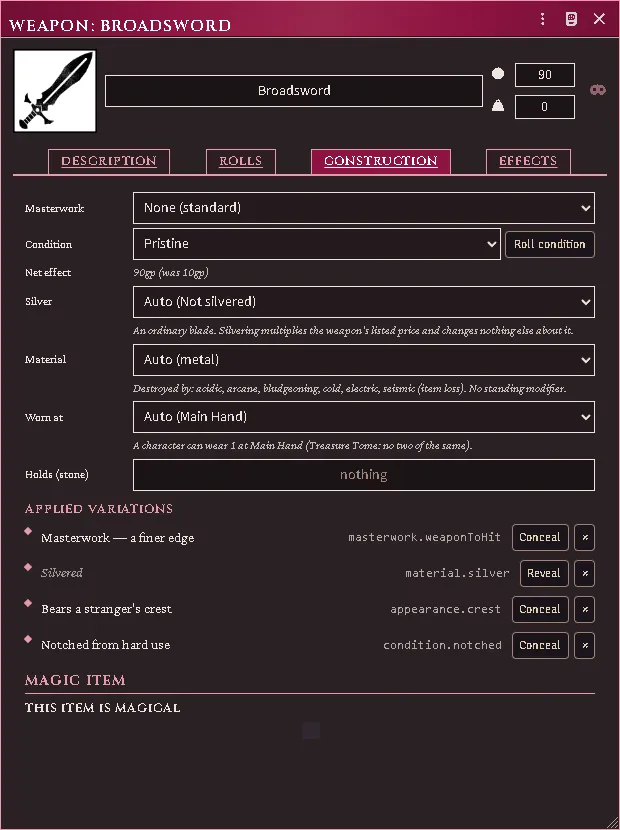
Several can be true of one blade at once. Two of the same kind cannot: try to add a second masterwork and the refusal names the one already there. Each time anything changes, the item’s attack bonus, damage, AC, weight and price are recomputed from its plain self, so what you see is always the sum of what is on it now — take everything off and the item is exactly what it was.
Conceal hides a variation from the players. They see the item without it and priced without it, while everything it does still applies: a disguised magic sword hits as a magic sword. Revealing one is what identifying an item is — there is no separate step. Legible is the other question: an inscription in a tongue nobody present reads is seen and not understood.
Writing your own
Section titled “Writing your own”You do not need to have imported anything. Make a Variation item on the Items tab and fill it in: what it is, what it changes, what it costs, and who may know about it.
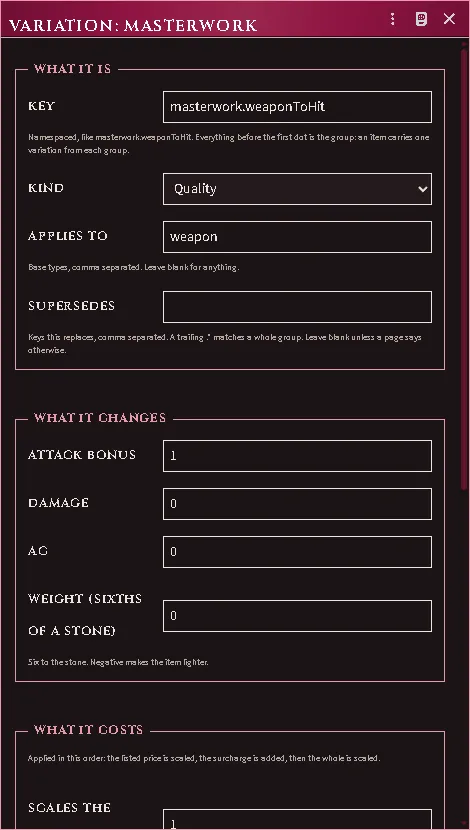
The key is the one field worth care. It is namespaced — masterwork.weaponToHit,
material.silver — and everything before the first dot is the group. An item
carries one variation from each group, so the group is what decides which of
your variations exclude each other. Everything after the dot is yours to name.
The three cost fields are applied in the order the rules use them: the item’s listed price is scaled, the flat surcharge is added, then the whole is scaled.
The old fields still work. Masterwork, Silver and the shield variant are still their own controls further up the same tab, with their own numbers. Whichever of the two you use owns that kind of difference — put a masterwork variation on an item whose Masterwork field is set and it is refused by name, so the same change can never be counted twice. Those fields retire once the importer can publish them as variations from your own books.
Named items and overlays
Section titled “Named items and overlays”Optional overlays add: named-item rung tracking (advancing on levels gained while wielding, not on the wielder’s absolute level), masterwork and scavenged condition, enclosing helms, JJ shield variants and combat maneuvers. Each is a separate setting.
An item made from another wears a badge naming what it was made from, so an embellished blade is never mistaken for the plain one it copies.
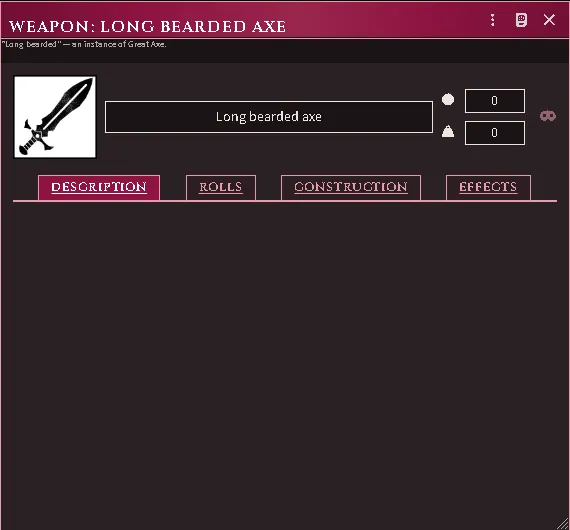
A skinned item’s badge naming its base, with the embellishment set apart.
The item sheet
Section titled “The item sheet”Every piece of gear — weapon, armour, item, coin — opens in one sheet whose shape never changes: a title band, an art row, and a strip of tabs that exist only when there is something to put on them.
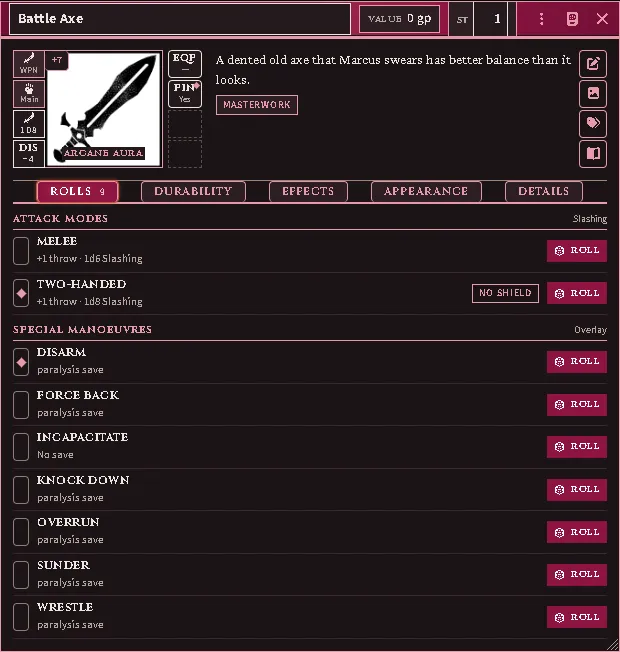
A weapon’s sheet: the band as the window header, the rails around the art, two pinned rolls, and the Rolls tab.
The title band is the window’s own header: the name, a quantity badge on a stack, the value and the weight (in stone — type it in stone, it is stored in sixths), a scene chip on a chart, and a Damaged / Destroyed tag when the item has taken harm. Damage cannot be disguised, so that tag shows whatever else the sheet is hiding.
On coin the weight reads the other way round. The badge is Per stone: how many of that coin make a stone, with what the stack weighs beside it. With the pencil pressed it is a field for a rate of the coin’s own; left blank, the coin weighs as the system weighs coin, and the greyed figure in the field is that rate. A coin’s value is its count at the worth of one, so it has no price to type and no value mode.
The art row. Left of the art, a rail of small cells: what the item is (a weapon shows its damage-type glyph), where it is worn, and up to two pinned rolls — click a roll’s lozenge on the Rolls tab to pin it, and the art carries it as a button. Right of the art, the state cells: EQP wears or wields it (on a stack it splits one out and equips that; click again to restack), PIN favourites it on the character sheet, CAP shows how full a container is, LOCK appears on a locked one. Beside the description, the editor rail: the pencil, which unlocks the whole sheet (until you press it every field is a reading, pointing at one says so, and only the use controls answer; press it again when done), then art, ownership (on a world item), and for the Judge the item’s source and identification.
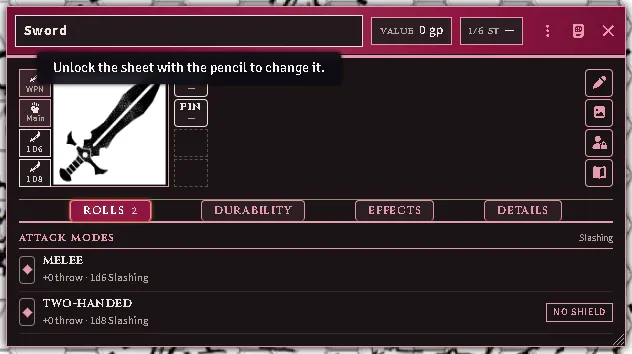
A sheet as it opens: the pencil unpressed, every field a reading that says so when pointed at, and the use cells on the rails still live.
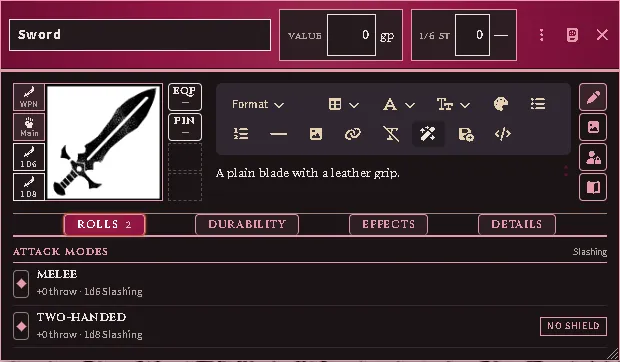
The same sheet with the pencil pressed: the description editor open beside the art, its toolbar wrapped onto a second row above the text.
The tabs, always in this order and only when earned:
- Rolls — a weapon’s attack modes, the special manoeuvres when that overlay is on, a spell book’s recorded formulae, a locked container’s Pick / Break rows. Roll buttons appear only where a real throw exists — the lock rows need the character’s own Lockpicking or Dungeon Bashing.
- Chart — drop a Scene on any item and it becomes a chart of that scene; Update From Exploration captures the explored fog of war and records how much of the scene is charted.
- Durability — condition, armour class now-of-full, material; and on a container, the lock: locked, quality, the pick modifier, the keys that open it (drop key items on the row), fragile contents, and the Bash button.
- Effects — the item’s own Active Effects (hidden from players until a magic
item is identified), what the bearer grants it (class, proficiencies,
attributes — read only), and for a named item The Name: the pip track,
the true name (Judge only), guessing and renaming.
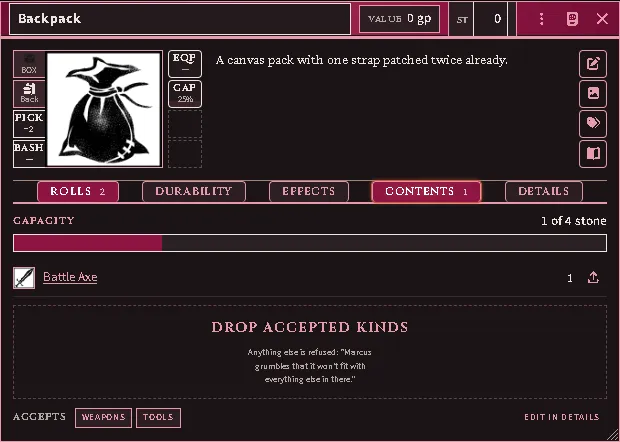
A backpack’s Contents: the capacity bar, the stored gear, and the drop zone that names what it accepts.
- Contents — a container’s load bar, what is inside, and the drop zone that names what it accepts and quotes its refusal. A spell book keeps its page count and formula list here.
- Appearance (Judge only) — whether the item is magical, what the players know (found / aura seen / identified) and its aura school; and the disguise: tick Can be disguised, drop any item on the panel, and players see that item’s name, art, description and price while the real effects keep working. Preview As Player shows what they see.
- Details — the price ledger (listed price, plating, masterwork, variations, condition, final) with the value mode (Priced / Unknown / N/A), the applied variations, the feature switches (Holds other items, capacity, Will Accept kinds and the refusal message), the construction controls (their shape is Worn at, above), and the core record fields.
An item with nothing to roll, no effects, no durability and no contents — coin, gems, a trinket — drops the tabs and the state rail entirely; a quiet Details button unfolds that one panel when you need it.
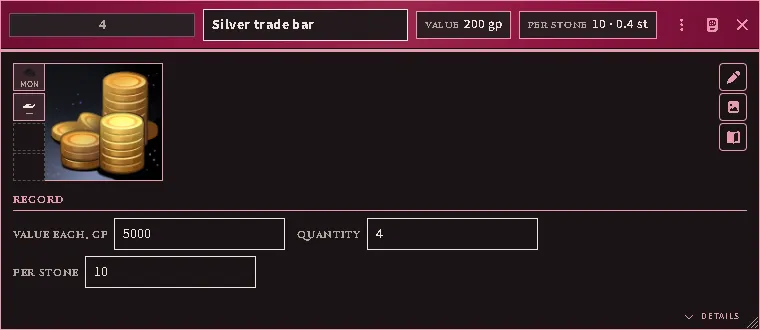
Coin in simple mode: the band with its count, the stack’s value and Per stone — the rate, then what the stack weighs — the art, and the record of what one is worth, how many there are and how many make a stone.
Common problems
Section titled “Common problems”The container section vanished. It should not — sections always render, even empty. If a bucket is missing entirely, report it.
A shield gives no bonus. JJ shield variants: a shield strapped on the back protects only the rear, which is situational rather than ordinary AC.
“You have no free hand.” Something is already held. Sheathe or stow it — the loadout summary shows what is occupying what.
A torch is an item, not a weapon. Correct: a torch is carried as a stack and becomes a 1d4 weapon only when one is readied for use.
Every feature here is free and none of it is gated. If it earns its keep at your table, you can chip in on Patreon.