
Classes — using them at the table
Getting class documents
Section titled “Getting class documents”Import them from your own book: connect the Revised Rulebook — and By This
Axe, if you own it — in the importer, then run
Import Everything from the Macros compendium (or
acksExtras.importer.importClasses() for the classes alone). Every class arrives as a
Class item — progressions, saves, awards, starting templates — read from
your PDF. Or build homebrew from scratch: Create Item → Class opens the
same constructor.
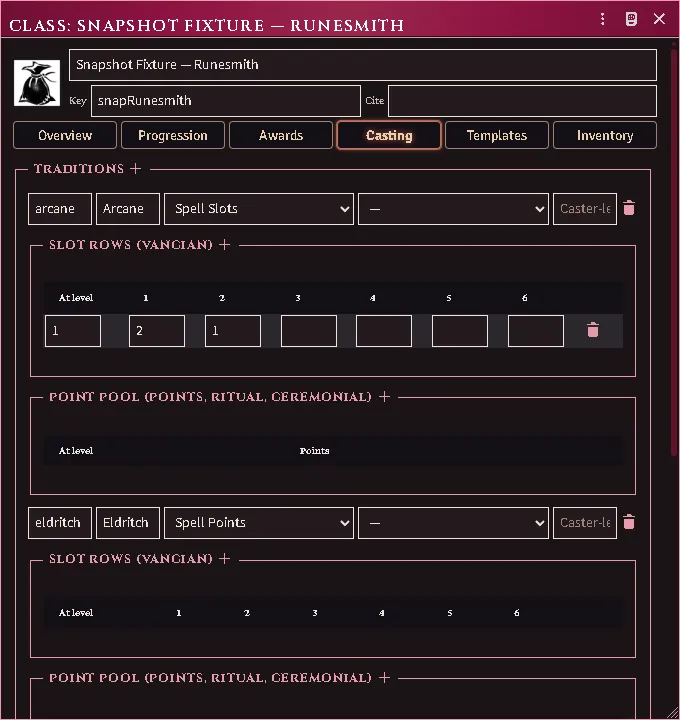
The constructor’s Casting editor: traditions, slot grid, pool schedule and caster-level ladder.
The constructor is built to be read at a glance: each reference row leads with the name of the document it points at — click it to open that document — and a reference nothing answers is marked so a broken row looks broken. Every list is a drop zone: drag an ability from the Items tab or a compendium onto the awards, a template, the inventory or a race’s rungs and traits, and drag a weapon, armour, an item or a spell onto a starting template to add it to the list it belongs in. A drop a list does not take tells you what it does take. The Overview tab states the class’s combat training — weapons, the heaviest armour and the fighting styles — which is what a character made from the class is trained in.
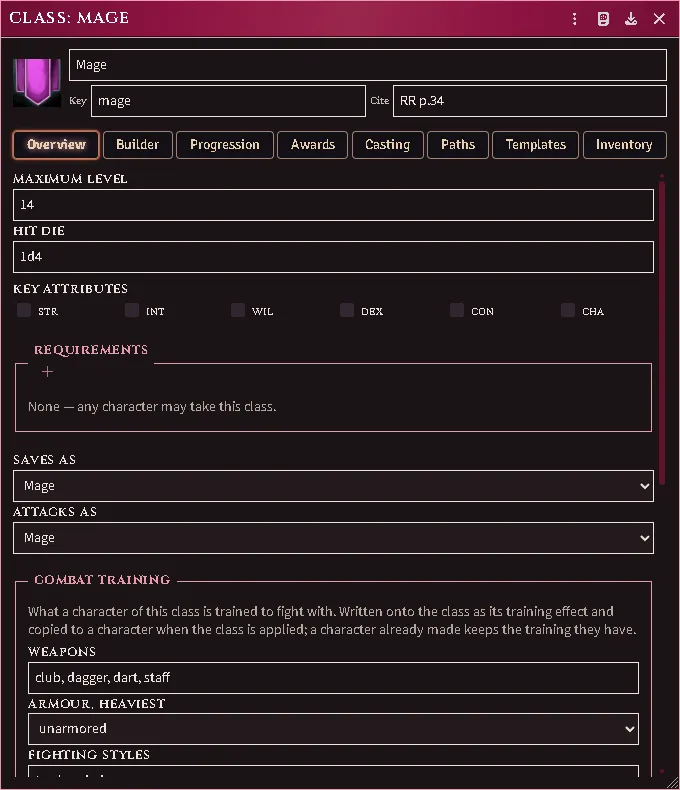
The Overview tab: the class’s combat training beside its chassis.
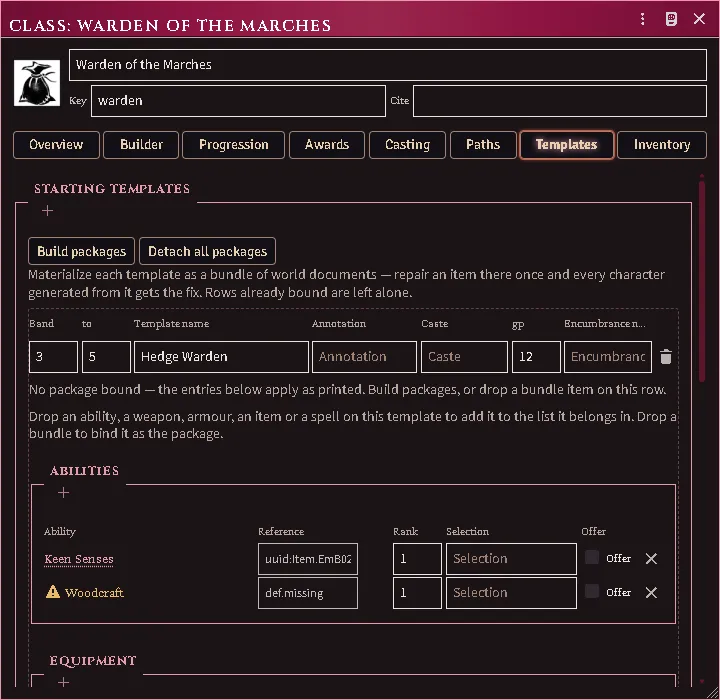
A starting template: abilities, gear and spells by name, a reference nothing answers marked, the whole row a drop zone.
A row whose spells were still printed names when its package was built — the class imported before the spells were — relinks them on the next Build packages (a class re-import or repair runs the same pass): each spell a document now answers joins the package and leaves the printed row. A package you edited by hand is left as it is and named in the report.
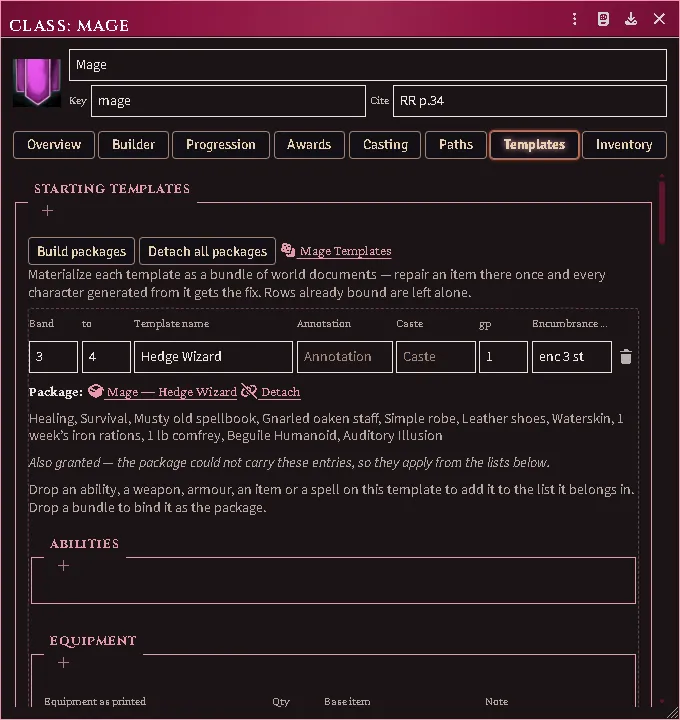
The same template once packaged: the package names what it hands over, the relinked spells among them.
The same constructor records what a class speaks and how many more tongues it may choose.
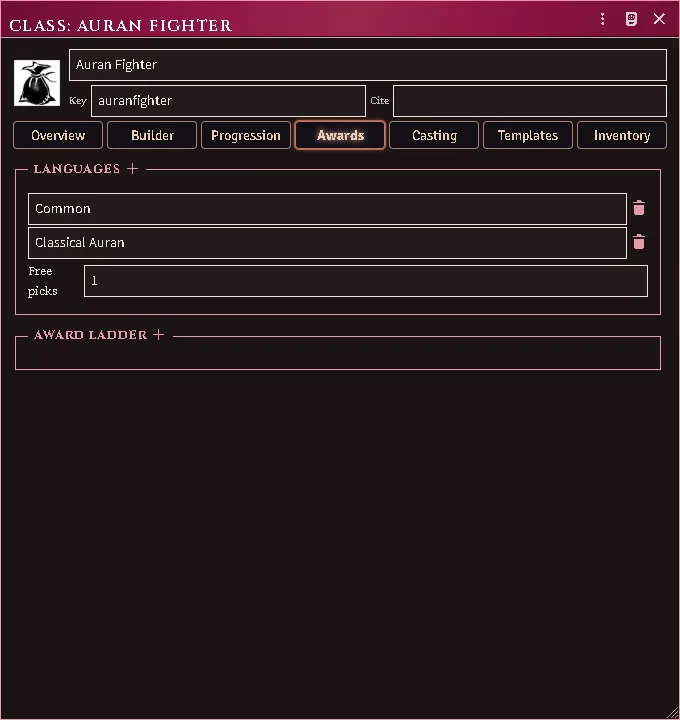
What a class speaks and how many more it may choose, beside its award ladder.
On the character sheet
Section titled “On the character sheet”Three small controls appear beside the class field:
-
Graduation cap — bind the character to a class document and apply its printed numbers for the current level (saves, attack throw, title, XP-to-next, hit dice, cleaves, spell slots). The confirm lists every change old → new and flags anything you hand-edited since the last apply.
It also hands over the abilities that level owes — Adventuring, every power and proficiency the class awards at or below the level you set, and a picker for each choice the ladder leaves open. A character bound at 5th arrives with all five levels’ awards, not with the fifth level’s alone. What they already carry is not given twice, and what lands is posted to chat. Dropping a class document onto the sheet does the same thing.
Applying the same class at the same level again is how a character who was bound before this existed collects what they were always owed: the fields will show nothing to change, and the abilities will still be listed.
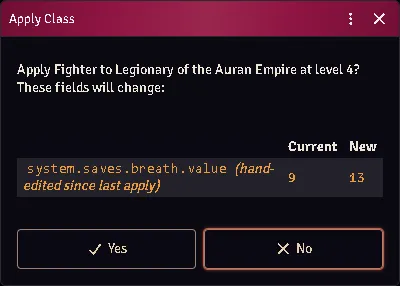
Every change old → new before it lands, with hand edits flagged.
-
Dice (level 1 characters) — roll a starting template: 3d6, then choose the rolled template or any lower band. The menu stays closed until the die gives it something to offer, and a class whose entry prints no packages leaves it closed for good — the note under the menu says which of the two you are looking at. A Judge’s override lifts the die, never the empty class. Applying grants the proficiencies (ranks and selections included), the equipment — each piece named as printed over its base item’s mechanics — the coin, and your Intellect bonus proficiency picks.
Each template can be a package: a bundle item holding the template’s actual abilities and gear as world documents, linked from a 3d6 roll table on the class (the importer builds these; the class sheet’s Templates tab has a Build packages button for hand-made classes). If the import got a piece wrong — a staff that landed as un-wieldable plain inventory instead of a weapon — open the package, fix that one item, and every character generated from the template afterwards gets the corrected version. Your repairs survive re-imports.
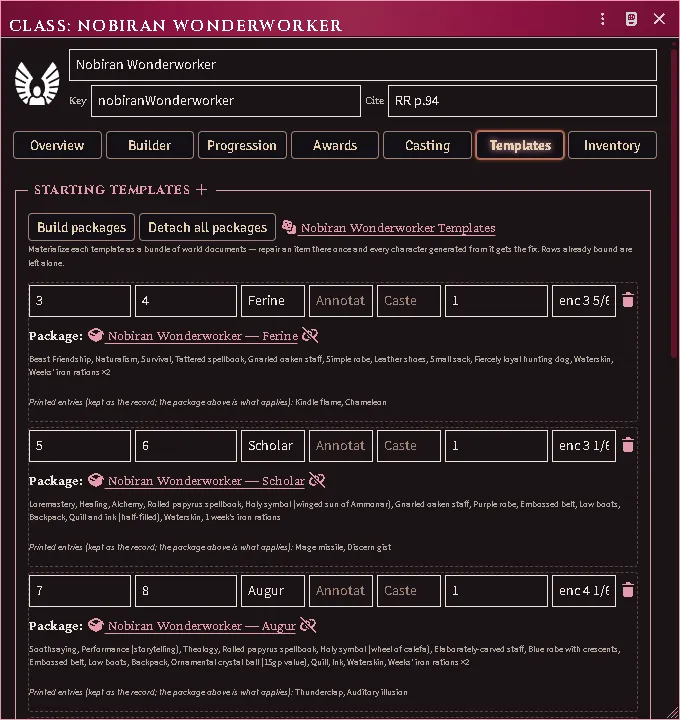
A class’s Templates tab with its packages built: each band is a bundle of real, repairable documents.
-
Rising arrow (when XP qualifies) — the level-up wizard: HP rerolled per RAW (full Hit Dice, Constitution per die, never on the flat bonus past 9th, minimum one over the old maximum — an additive house rule is a world setting), the new level’s powers granted, class/general proficiency picks offered, slots bumped.
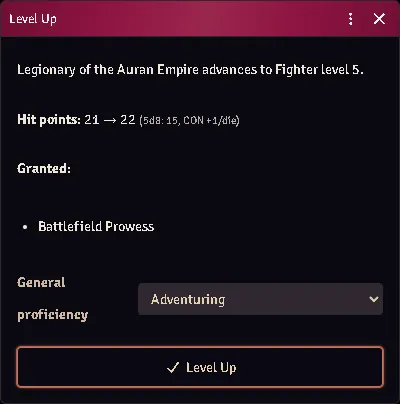
The level-up wizard: the HP reroll it will apply, the powers granted, the picks offered.
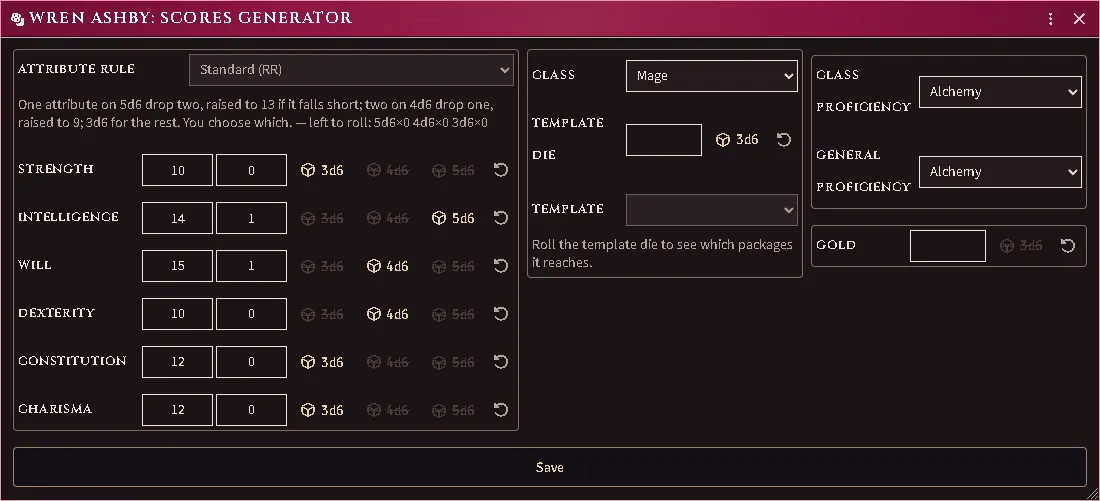
Rolling a character: the attribute rule and the scores, the class above the template die still to throw, and what is left to choose.
The graduation cap opens the same three-column page for a character who is already played: the level being set and the ladder picks that come with it, the class and its optional starting package, and each choice that level owes.
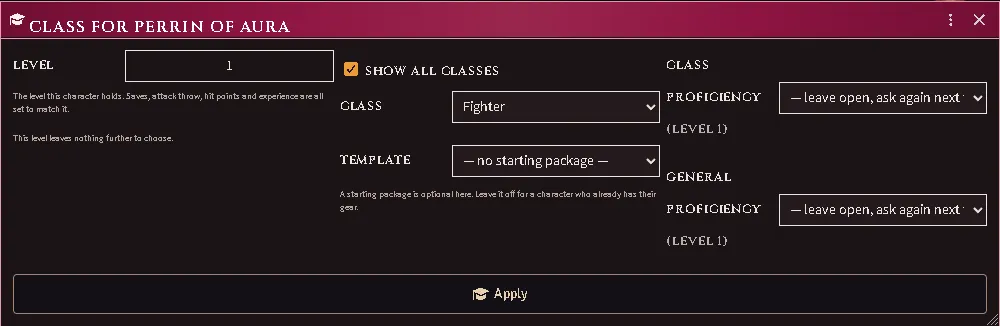
Binding a class to a played character. The starting package is opt-in and defaults to none — it is ADDED to what the character already holds rather than replacing it, because binding a class to someone who has been adventuring is the opposite act to generating them.
A proficiency you already have is an answer. Each choice lists what the character already holds first, and picking it closes the choice and grants nothing — you no longer have to take something unwanted and delete it afterwards. Beside the options sit already covered, for the proficiency the choice never listed, and leave open, the one answer that closes nothing. A choice answered anywhere — here, at level-up, or during character generation — is remembered, so re-applying a class does not walk a 5th-level character through every decision they have ever made.
A choice left open waits in the picker, not at the next level-up. Level-up asks for the level being gained and nothing else, so a proficiency left open at 5th is not a question 6th will ask. It waits here instead — the picker offers every unanswered choice up to the character’s level, however long ago it was earned. That is how to build a high-level character and leave the proficiencies to the player: level them up leaving each choice open, then let them open the picker on their own sheet — the button is theirs whenever they own the character — and answer their own. Re-applying rewrites the injected Class modifiers effects, so hand-edits to that block do not survive it.
One award climbs one level. Experience added to a character bound to a class — typed into either sheet, dealt from the party sheet or the formation — stops one point short of the level after next, and a notice says how much was not recorded (RR ch. 6, experience from adventuring). Setting the level at the same time (the picker) sets the experience with it, and a successor started from the player’s legacy fund keeps all of theirs, climbing one press at a time.
Experience is tracked for player characters and henchmen. The limit above, the “ready to level” notice, the level-up arrow and a share of dealt experience belong to a character a player owns, or to a henchman. A character no player owns and nobody hired is an NPC: their level is whatever you set, and their experience follows it. A character you build for a player counts as an NPC until you give the player ownership.
Lowering a level undoes what the climbs above it settled. Type a lower level and the choices those levels asked are asked again at the next level-up — what the character still holds is listed first, and answering with it grants nothing — and hit points return to the maximum the character had at that level, when the level-up wizard recorded one. Abilities those levels granted stay on the sheet: delete them by hand if the lost level should take them.
A typed level brings its class row with it. Change the level on either sheet, up or down, and the saves, attack throw, title, experience to next level, hit dice, cleaves, damage bonus and spell slots change to that level’s row in the same save. The experience moves with it: up to the new level’s threshold, or down to one short of the next level’s, unless it already sits between the two. The same happens when an import or the class picker sets the level, but a figure the import reads from the sheet wins. A typed raise rolls no hit points and grants nothing new: use the level-up arrow to climb, or the class picker to set a level together with everything it owes.
Leaving 0th level (RR ch. 6; JJ ch. 9). A character whose level is 0 (a level-0 hire, say) shows the experience 1st level needs once the experience tables are imported, and the Class tab says when it is reached. The Judge chooses the class, so the arrow is the Judge’s: it opens the class picker at 1st. Applying keeps the better hit points, grants Adventuring and the class’s 1st-level awards, and leaves the experience alone. A dialog then asks what becomes of each proficiency the character held:
- Kept.
- Replaced by a class power. A proficiency the new class grants as a power is offered this first, and stays on the sheet as that power. One you mark replaced yourself, covered by a different power, is removed.
- Lost. A class proficiency the new class does not list is offered this first.
- Erodes. The dialog counts the general proficiencies held against the 1st-level limit. Mark the ones past it: each shows an Eroding tag on both sheets until you remove it as time passes.
Closing the dialog changes nothing. A chat card lists what was replaced, lost and marked.
Casters get a per-tradition slot strip under the class field — click a pip to spend, click a spent pip to refund, the bed icon to rest. The Nobiran’s arcane and divine pools sit side by side.
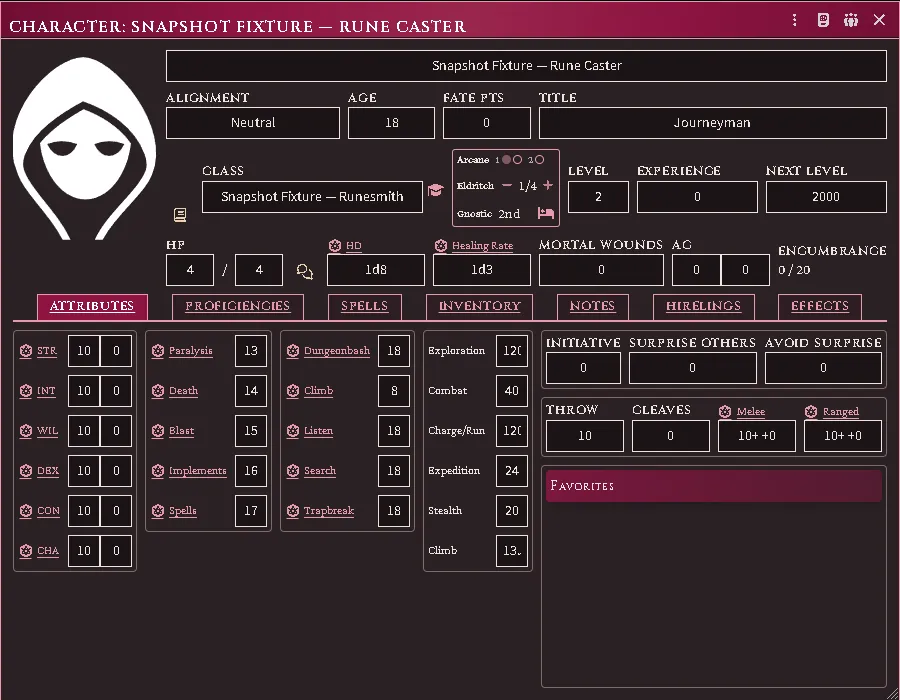
Slot pips, a points pool with its −/+ pair, the gnostic capacity rung, and the rest control.
Class modifiers — what the class trained them in
Section titled “Class modifiers — what the class trained them in”Applying a class copies its combat training onto the character. That copy lives on the Effects tab as a Class modifiers section: the fighting styles, weapon classes and armour rungs the class grants, each one a switch. Click a slot to grant it, click a lit one to withdraw it.
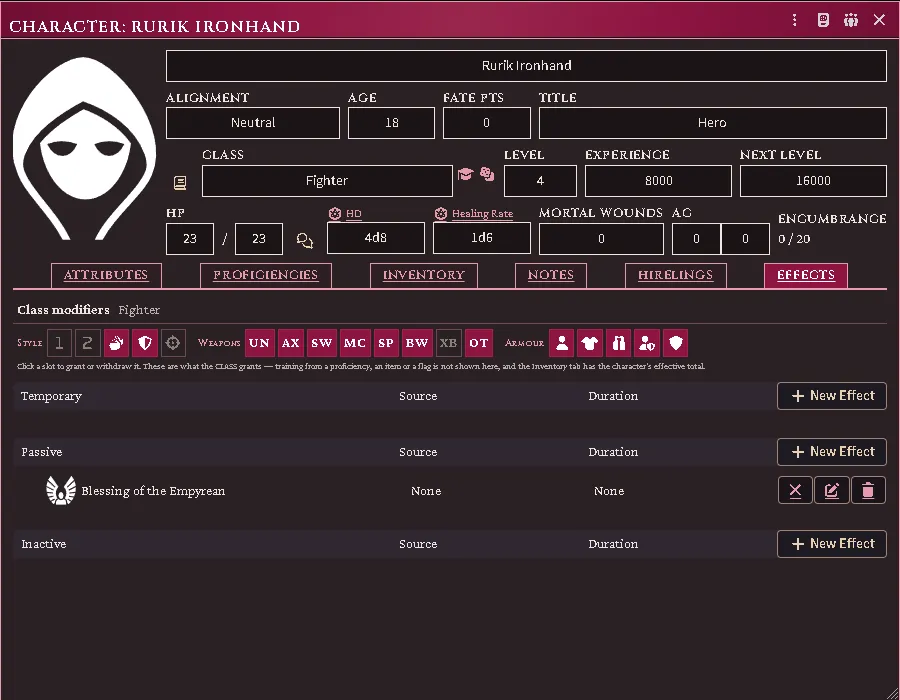
A Fighter with the dual-weapon style and crossbows withdrawn — the two outlined slots. The hand-made effect below keeps its own controls.
Two things are worth knowing about it:
- It shows what the CLASS grants, not the character’s total. Training also arrives from proficiencies, items and flags, and a slot lit by one of those could not honestly be switched off here. The Inventory tab’s Training row is the effective total; this is the class’s share of it.
- Armour is a ladder. A click sets the heaviest armour allowed and lights every rung below it; clicking the top rung clears the grant entirely.
- A class trained by size or by missile lights the slots that covers. A grant of every missile weapon and every melee weapon up to medium size lights all but Unarmed. Withdrawing one slot rewrites the grant as a list of weapon classes, so the size limit is lost — every sword, not only the medium ones. Re-applying the class brings the printed clause back.
Re-applying the class restores its full grant, which is how you undo a set of edits. The effect itself cannot be deleted — see below.
Effects the module maintains
Section titled “Effects the module maintains”The Class modifiers training and the Equipment Loadout are machinery, not notes: deleting either quietly breaks the character, so both refuse deletion and show a lock where the trash would be. They can still be edited, emptied and disabled — emptying the training is how you leave a character deliberately untrained, and it stays that way until the class is applied again. The loadout is rebuilt from what is equipped, so emptying that one lasts only until the next change. Deleting the character works exactly as before.
Legacy — the reserve fund, funerals and a will
Section titled “Legacy — the reserve fund, funerals and a will”The Legacy chip on the Class tab opens the player’s legacy (RR ch. 6, Experience). The fund belongs to the player, so every character that player owns shows the same ledger; the chip shows the fund once it holds anything.
- Recording (Judge). Enter the gold a character spent, choose Into the reserve or Heroic funeral, and the ledger records the experience it is worth at the imported rate. Leave “pay from the purse” on to take the coin from the character at the same time. A mistaken row can be struck.
- Starting a character (Judge). On the new character’s window, pick the character they follow and press Start: their experience rises to the figure shown, and any funeral used is marked claimed. The level-up button then climbs them.
- A will. The character’s owner names an heir and an estate; the Judge settles it when the time comes, and the heir’s vault receives the estate less the bank’s charge. An heir with no vault is given one (Places and storage).
- A character nobody owns (a Judge’s back-up character) needs a player assigned at the top of the window before anything records.
Import the rules tables once so the rates are read from your book; until then the window says so and records nothing.
Advanced mode — the class builder
Section titled “Advanced mode — the class builder”The constructor’s Builder tab is the Judges Journal’s custom-class workflow as a tool for balanced homebrew — it never replaces the simple constructor, and it never blocks: the printed tables stay hand-editable in both modes, and the accounting line reports (points spent, power picks left, the 2nd-level XP cost) rather than enforces.
Tick Advanced mode, set your build values — Hit Die, Fighting (with the 1-point a/b split), Thievery and its chosen skills, one row per magic value (arcane and divine arrive with the Judges Journal import; ceremonial, gnostic, alchemy, eldritch, fairie or your own tradition are rows of the same shape once their tables are in the world), and a racial value spent against a bound race document. Trade-offs and custom powers have their own lists. Derive class tables then shows exactly what it will write — XP schedule, hit die, maximum level, attack throws, saves-as, cleaves, casting grids, ladders, racial traits — plus every question the imported tables could not answer, and applies it as one update you can tweak afterwards.
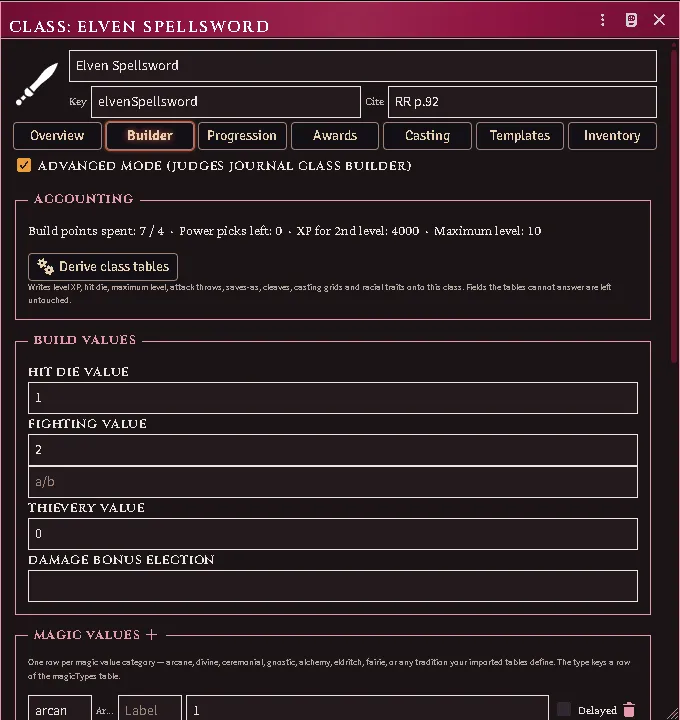
The Builder tab on an imported Ready-for-Play example: build values, the accounting line, and Derive.
Everything numeric comes from your own book: run Import Everything with the Judges Journal connected, and the builder tables, the Dwarf and Elf race documents, and the printed Ready-for-Play builds on the core and demi-human classes all land together — open any of those classes on the Builder tab and Derive reproduces its printed spread.
A race document (its own item type) carries the racial value ladder: each rung’s XP cost and granted powers, the race’s attribute floors, how it stacks with a magic category, and its post-8th XP increases. Simple-mode classes may bind one too.
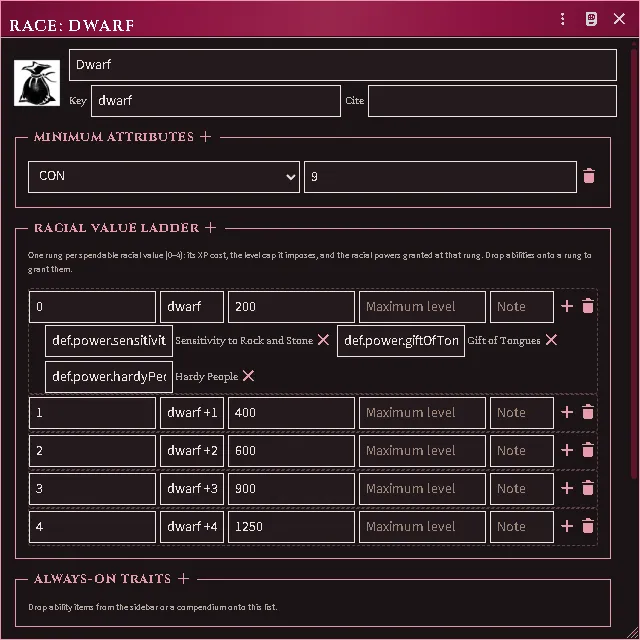
A race document’s value ladder — rung XP costs, attribute floors, and every granted power resolved to the definition its rung names.
Adding an ability of your own — a racial trait for a homebrew race, a power no book prints. Abilities are items of the type the system calls Proficiency (their sheet is ACKS Ability): create one in the Items tab, fill in its sheet, and it is an ability like any imported one. Any ability row on a class — an award on the Awards tab, a template’s Abilities list on the Templates tab, the Inventory lists — is filled by dragging the item from the Items tab or a compendium onto the row; the ref writes itself and the name appears beside it. The folders the importer files abilities under (Class Powers, Class Training, and the rest) are just folders: an ability dragged from anywhere, including one you made, works the same way.
Keeping documents current
Section titled “Keeping documents current”After reconnecting your book, acksExtras.importer.cookbookUpdateClasses() rewrites
imported class documents from the page (hand edits on them are replaced —
the confirm says so). A combat training you edited on the class sheet is the
one exception: it is kept where the book’s would have been rebuilt. repairSaveReferences under
acksExtras.classes finds stale save-key references world-wide; dry-run by
default.
Paths — when a class offers a choice
Section titled “Paths — when a class offers a choice”Some classes are not one thing. A Barbarian’s training depends on their region; a Zaharan has a dark path; a dwarf has a caste. On the class sheet these are Paths: named groups, each holding options of which a character takes exactly one, and an option can carry its own weapon, armour and fighting-style training.
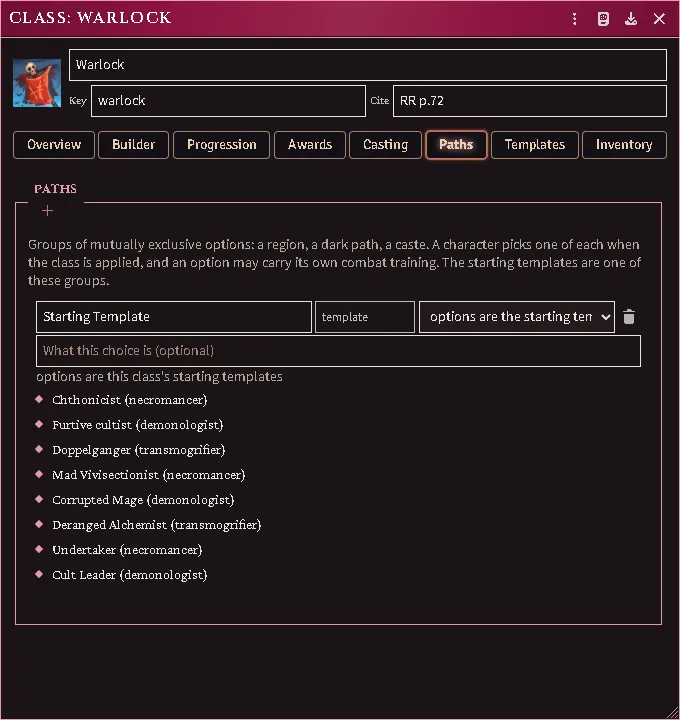
Imported classes get theirs automatically. Every class you import has a Starting Template group, and a class whose book prints a variant table — the Barbarian’s regions — gets that group too, with each region’s own weapons, armour and fighting styles.
You can write your own. On the Paths tab, + adds a group; inside it, + adds an option; each option takes a weapon list, an armour rung and its fighting styles. A group can instead be pointed at the class’s starting templates.
Your starting templates are one of these groups. They are shown in the list beside the others, and nothing about them moved — the same rows, the same package bundles, the same 3d6 table you already had.
When you apply a class to a character, you are asked once for each group, with whatever the character already chose pre-selected. Choosing a region grants that region’s training; choosing a different one later swaps it rather than adding a second. A group you leave unanswered grants nothing — the module will not pick a region for you.
Taking a starting template that names a variant answers the group for you: “Pit Fighter (Jutland)” chooses Jutland, and the training follows. A template that names no variant leaves your choice alone, and so does a second template if you have already chosen.
Picks a character still owes
Section titled “Picks a character still owes”A printed starting package does not only hand things over. Sometimes it hands over a choice — “and one spell of character’s choice” — and until now that arrived as a sentence on an item’s note, where nothing on the character showed it and the pick was quietly never made.
Such a row now arrives on the character as a marker named for the question it asks. The chargen chat card lists it under its own heading, apart from what was granted and from what could not be resolved. Clicking the marker opens the chooser; what you pick replaces it.
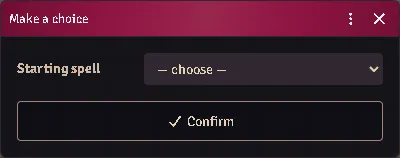
The list is drawn from the class’s own traditions, and — for spells only — from whatever spell compendia the world has, so a table that has imported no spell list of its own can still answer the offer. Nothing is chosen for you: the control opens on “— choose —”, so closing it without deciding leaves the pick standing rather than spending it on whichever option sorted first.
Since 9.1.0 the chooser lists what the character casts at the level being set — a starting character’s first, the level a level-up climbs to — and a class whose page prints its own repertoire (the bladedancer, crusader, priestess and shaman) offers that list alone; its Casting tab says how many spells the list holds.
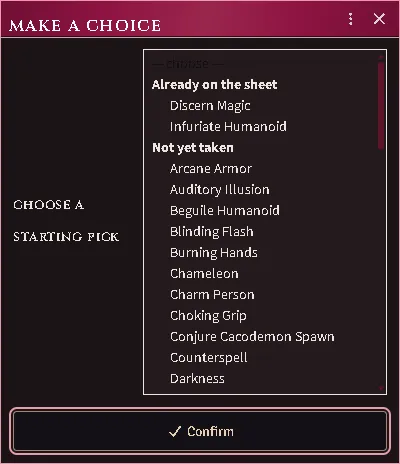
A mage template’s spell pick: first-level arcane spells, nothing above, the ones already on the sheet grouped first.
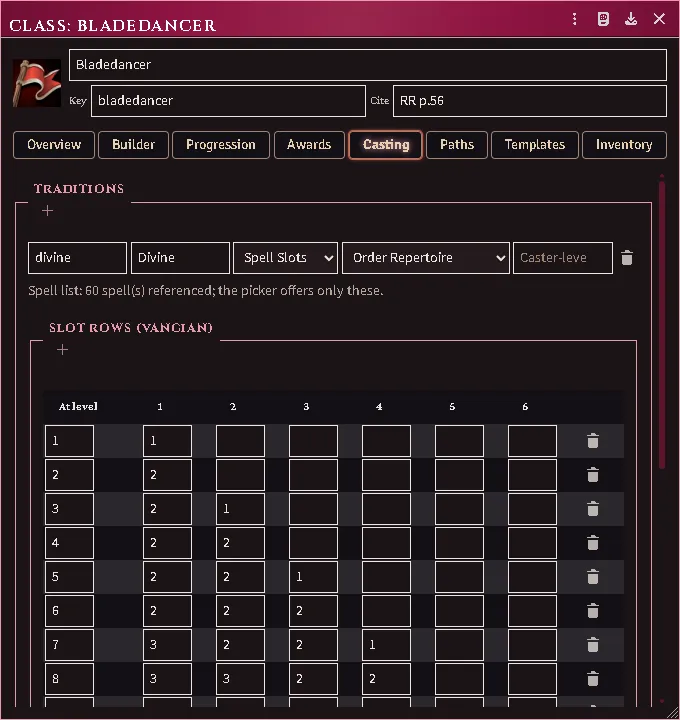
A class whose page prints its repertoire: the Casting tab counts the list every spell pick is held to.
Answering is remembered against the character, not against the row’s position, so re-running the generator or re-applying the class never asks twice and never brings a settled pick back.
Building a race
Section titled “Building a race”Create Item → Race opens the race constructor: attribute minimums, the racial value ladder — each rung an XP cost, a level cap and the powers it grants — and the always-on traits. Rungs and traits take an ability dropped from the Items tab or a compendium, once each.
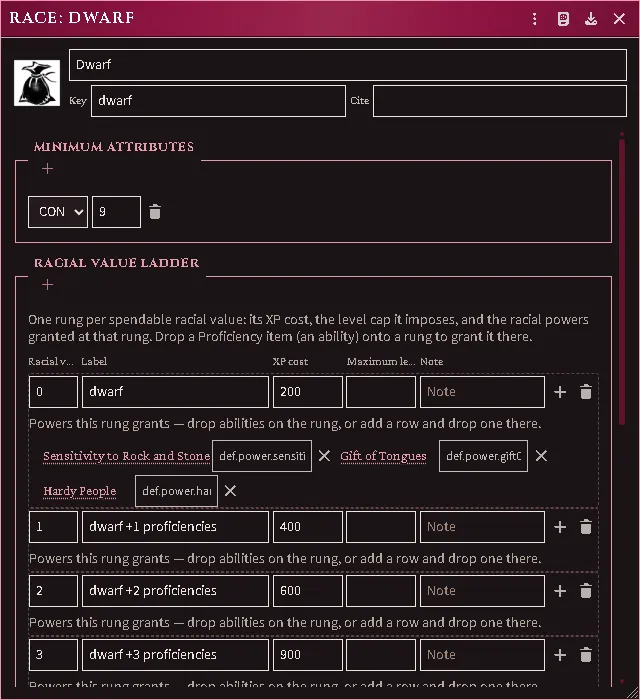
A race’s minimum attributes and its value rungs, the powers the first rung grants named on it.
What a race adds after 9th level
Section titled “What a race adds after 9th level”Past 9th level a class stops gaining Hit Dice and gains a flat number of hit points instead. The rate comes from the class’s saving-throw progression, and some races add to it. Both numbers are read from your own books; the race’s share is on the race document, where you can also type it for a race the importer has no recipe for.
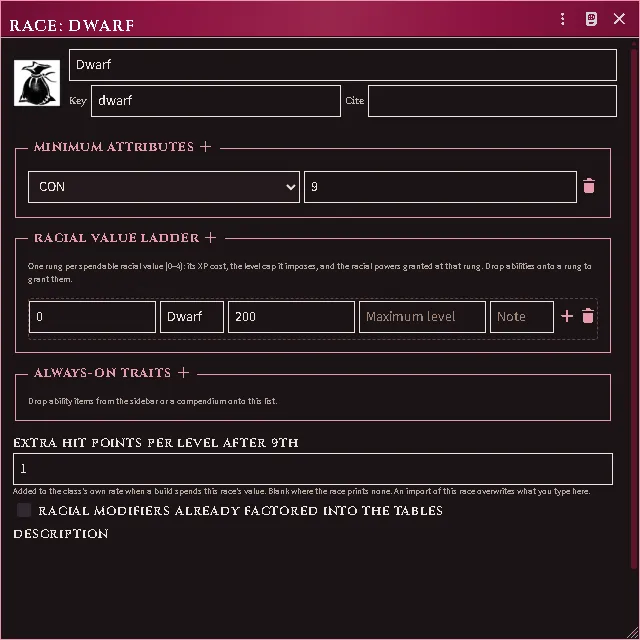
A build that spends this race’s value picks the bonus up on the next Derive; the class’s level table then shows the printed flat on every row past 9th. Where the world has not imported the class-side rate, the derive reports that gap by name and writes no flat at all rather than guessing one.
Every feature here is free and none of it is gated. If it earns its keep at your table, you can chip in on Patreon.