
Factions, standing and status
A faction is an organisation the party has dealings with: a guild, a temple, a syndicate, a noble house, the watch. It is an actor like any other, so it has a sheet, a token, a place in a folder, and a name the reaction roller can aim at. What it adds is a ledger: how this organisation stands toward a party or a character, in figures the Judge writes.
Nothing on the ledger is a score the book prints. The module keeps the rows, adds them up, and carries the total to the places it matters; what a favour is worth is yours to say.
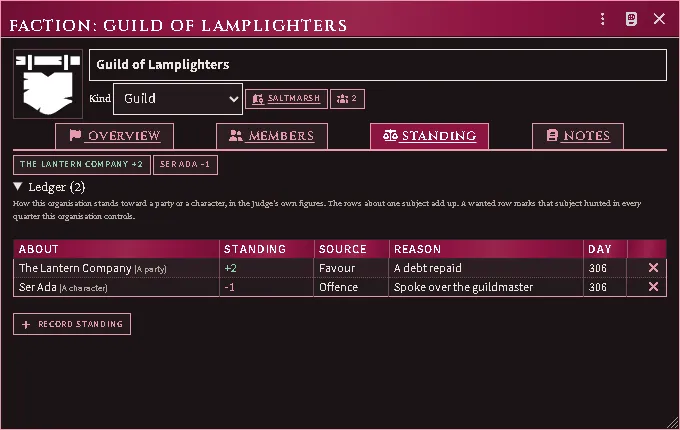
A guild’s ledger: a favour owed to the party, an offence held against one of its members, and the running total for each above the rows.
Make a faction
Section titled “Make a faction”Actors sidebar → Create Actor → type Faction.
Overview says what the organisation is and what it holds.
- Kind — guild, temple, syndicate, noble house, watch, merchant house or other. It is a label, with one exception described under Legal authority below.
- Seat — the place it is found at. Drag a place onto the sheet; the first one you drop takes the empty seat.
- Places — the other roofs it is behind: a chapter hall, a front, a safehouse. Once there is a seat, every further place you drop lands here. Type what it is beside the name; the eye hides one from players, and × strikes it off. Dropping a place on the Seat row moves the seat instead.
- Leader — drag an actor onto the leader row.
- Part of — the organisation this one belongs to. Drag a faction onto the sheet while Overview or Members is showing, or pick one. A faction cannot be put above one it already answers to.
- Quarters it controls — pick a district and press Control. The list offers every Region marked as a district on any scene (streets and quarters); × releases one.
Members is the roster. Drag actors onto the sheet to enrol them; the eye hides a member from players, and × strikes one off. The count in the header counts a group’s whole stack.
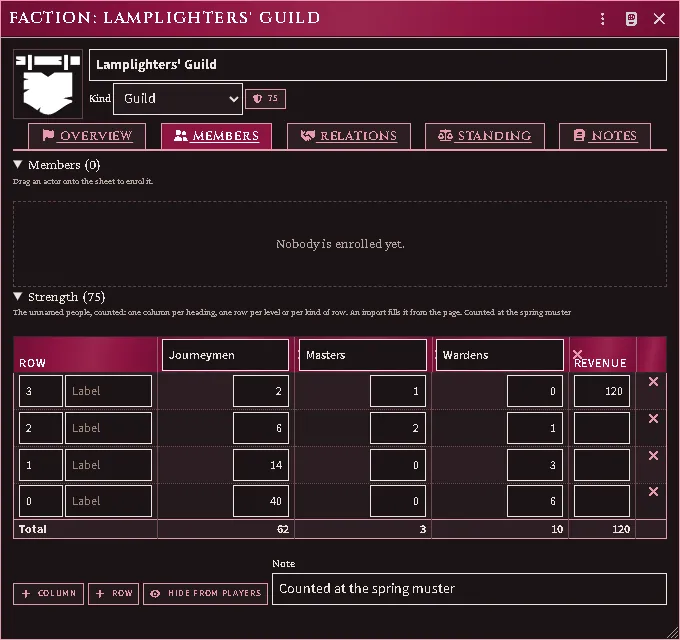
Beneath the roster, Strength counts the people nobody names: a column per heading (a class, an order, a troop type), a row per level or per kind of row, a count in each cell, and a revenue where a row has one. Add columns and rows with the buttons, type into any cell, and drop a row or column with its ×; the total row and the shield count in the header are worked out for you. Hide from players hides the whole table. A faction imported from a book whose page prints its strength arrives with the table filled and the page noted beneath it.
Notes has a shared page and a private one only the Judge can read.
Who deals with whom
Section titled “Who deals with whom”Relations is what this organisation thinks of the others. Pick one in the picker and press Add, or drag a faction onto the tab, then set the stance — allied, friendly, neutral, rival or hostile — and write a line about what lies between them. The eye hides a row from players; × drops it.
A stance is a word, not a number. It says nothing about the dice, and nothing adds it to a throw; what a feud costs is a ledger row, below.
Each side keeps its own row. A guild that believes the syndicate is friendly while the syndicate has it down as prey is two rows that disagree, and that is the point. How others regard it underneath is the other side of the book, read here and written on their sheets. The party and its members is the ledger’s running total for every subject it names, so one tab tells you where this organisation stands with another organisation, with a character and with the party at once.
Only the Judge writes relations and places. Players who can open the sheet read them, and never see a row marked hidden.
Keep the ledger
Section titled “Keep the ledger”On Standing, press Record standing and say:
- About — everyone, one party, one character, or another organisation.
- Standing — a signed number. Yours.
- Source — favour, offence, crime, wanted, or the Judge’s word.
- Reason — what happened, for the next time you read the row.
Dragging an actor or a faction onto the Standing tab opens the same prompt already about them. Rows are stamped with the day they were written. The rows about one subject add up, and the totals sit above the ledger; × strikes a row.
A row about a party counts for every member of it, a row about a character counts for that character alone, and a row about an organisation counts for everyone on its roster — which is how a feud between two houses reaches the guildsman standing in front of you. Players who can open the sheet can read the ledger and cannot write to it.
What standing does
Section titled “What standing does”It prices the reception. When a character rolls a reaction, the roller lists Standing with each organisation that has a say, with the ledger’s total for that character and their party:
- the organisation itself, when it is the target;
- every organisation the target is a member of;
- every organisation controlling the quarter the party stands in, whoever the target is.
These add to the district’s own figure and to each other, each organisation once. Rolls that are not a reception — loyalty, morale, obedience — are left alone.
When an organisation across the table has written down what it thinks of one
the speaker belongs to, and that stance is anything but neutral, the roller
says so —
The quarter’s organisations are listed on every reaction roll made there. The
two rows about the target, and the note about what its organisation thinks of
yours, arrive when the roller is opened with its target already named, which a
macro does with acksExtras.influence.open(actor, {targetActor}). The
Influence button opens the page first and reads the target from the token you
have targeted, and a roll opened that way does not carry them.
It sets the hunt. A Wanted row marks its subject hunted in every quarter the organisation controls. When the party enters the city inside one, or crosses into one, the settlement board’s Hunted here ticks itself and names who is hunting; the district’s hunted table then answers in place of its ordinary one. Untick it and your word stands for as long as the party stays in that quarter: the ledger is asked again only when they cross into another or come back to the city.
Legal authority. When a watch or a noble house controls the quarter and lists the rolling character as a member, the roller says Legal authority here and names it. The note adds nothing. Whether authority applies to this conversation is still the tick on the dialog.
It can move a market, if you want it to. Settings → Standing per market step is 0 by default, which leaves hiring untouched. Set it to a number and that much standing, held by the organisations seated at or holding a market’s place (or a place it is inside) or controlling its quarter, moves that market one class for that recruiter: larger for goodwill, smaller for ill will. The town’s own monthly pool is never moved, only what this recruiter finds in it.
Status
Section titled “Status”The reaction roller’s social status row fills itself with how many ranks the
speaker stands above the target, when both have a rank. A rank comes from the
domains module if it is installed, or from an item on the actor named like
Rank: 2 (Harbourmaster) — the number is the rank and is yours to set, the
words in brackets are the title. Nobody ranked, nothing filled.
From the adventure books
Section titled “From the adventure books”Books that describe a settlement’s organisations bring them in as factions. The importer’s getting started run has an organisations step: each one arrives as the kind the importer assigns it, seated at the place the book keys it to, with the people the book lists for it enrolled from whatever the world already holds. The quarters it controls arrive with the map: the maps step hands each organisation the regions its quarters became.
Where the book prints a body’s strength as a table, the step fills the faction’s Strength table from your own copy of the page, and the step’s report says how many were given their figures. A table you have edited is kept on the next run.
Running the step again makes nothing twice, and a faction you deleted comes back with its roster.
Every feature here is free and none of it is gated. If it earns its keep at your table, you can chip in on Patreon.