
Playing from Discord
Extras ships a bot that lives on the same machine as your Foundry server, holds a seat of its own in the world, and lets the members of your Discord server roll, speak and read their characters without opening Foundry. It is the first step toward play-by-post: the world keeps every roll and every word, and Discord is where they are made.
You set it up in Foundry: one window under Module Settings holds the token, the server and the channel, and the bot on your host reads them from the world. The host is asked only how to reach that world.
Every command runs as the Foundry user the member is linked to. A member can only use characters that user owns, and the bot’s own seat decides nothing. The Judge links members; nobody links themselves.
Walkthrough
Section titled “Walkthrough”Six steps, once. Nothing is typed on the server that a window in Foundry can be asked instead, and afterwards the bot follows Foundry’s module updater on its own.
1. The host
Section titled “1. The host”The bot runs on the machine that runs Foundry, beside it, and it starts with that machine rather than with the world: Foundry has no hand on the host, so nothing in a world can launch a program there. A bot that comes up before its world keeps retrying until the world answers. On Linux a service starts it with the host; on Windows, Task Scheduler starts it when you sign in (On Windows takes the place of step 4). That machine needs:
-
Linux with systemd — Debian, Ubuntu and their relatives; a Proxmox VM or container is fine — or Windows 10 or 11.
-
Node 22 or newer.
node -vsays which you have; Foundry itself runs on Node, so it is usually there already. -
A Chromium-family browser the service can run. Nothing shows on a screen; the bot drives it headless, and finds the browser by itself. On Debian,
sudo apt install chromium. On Ubuntu thechromium-browserpackage is a stub for the Chromium snap, and a snap will not start under a system service — install Google Chrome’s package instead:Terminal window wget -O /tmp/chrome.deb https://dl.google.com/linux/direct/google-chrome-stable_current_amd64.deb && sudo apt install -y /tmp/chrome.deb(an ARM host has no Chrome build; use Debian’s
chromiumor a Chromium from a non-snap PPA). The installer skips the stub and names what it found. On Windows, Microsoft Edge is already there and is found by itself. -
The Extras module installed in Foundry, 7.1.0 or later. The bot’s code is inside it:
discord/under the module’s directory in your Foundry data path,Data/modules/acks-extras/discord.
2. The Discord application
Section titled “2. The Discord application”In the Discord Developer Portal:
- New Application; name it after your table.
- On the Bot page, Reset Token. Keep the token where you can paste it into Foundry in step 5; the portal shows it once.
- On the OAuth2 page, in the URL generator, tick the scopes bot and applications.commands, then the bot permissions Send Messages, Embed Links, Attach Files and Read Message History. Open the URL it makes, pick your server, authorise.
That is all the portal is needed for. No ids to copy, no developer mode to turn on: the bot reads its own application, the servers it was invited to and their channels, and offers them to you in Foundry.
3. The bot’s Foundry user
Section titled “3. The bot’s Foundry user”In Foundry’s user management, create a user for the bot: role Assistant Gamemaster, named Discord (the name the bot looks for unless told another), and a password if your world uses them. The bot joins as this user and everything it posts is credited to it, so keep the user for the bot alone.
4. Install the service
Section titled “4. Install the service”On Windows, follow On Windows instead and come back for step 5. On a Linux host, in the bot’s directory:
cd /path/to/foundrydata/Data/modules/acks-extras/discord && sudo npm run install-serviceIt asks only what the bot needs to reach your world: Foundry’s address as
the machine sees it, the bot’s Foundry user and password, the browser it
found, the local port its seat listens on, and the account it will run as
(the owner of the module directory, which is what lets it keep its
dependencies there). On a standard host every answer is already filled in
and you press Enter through all of them. Then it writes them to
/etc/acks-extras-discord.env, readable by root only, renders the systemd
unit for this machine, installs the bot’s dependencies in front of you (a
minute or two the first time — npm’s own output, as the service’s user),
enables the service, and waits a few seconds to show you its state and the
first lines of its journal: the seat joining, or the reason it did not.
Run it again whenever you like, including over an earlier attempt that did
not work: it stops what is there, clears any failure state, rewrites both
files and takes over a node_modules another account left behind. Anything
Discord-related an earlier install kept in /etc is dropped and named — those
values live in Foundry now.
If sudo npm cannot find npm (Node installed through a version manager), run
the script with the node you have instead:
sudo "$(command -v node)" src/install-service.mjsWatch it come up:
sudo journalctl -u acks-extras-discord -fThe log shows the seat joining the world, then the bot saying it has no token yet and is waiting for one. That is the expected state at this point.
5. Configure it in Foundry
Section titled “5. Configure it in Foundry”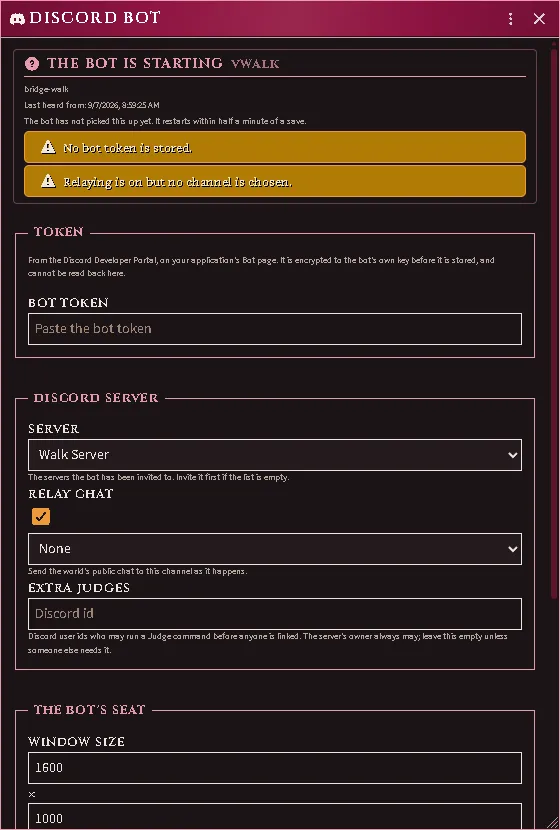
In Foundry, Settings → Module Settings → ACKS II Extras → Discord Bot. The window opens on the bot’s own report: it says the bot is waiting, and lists what is still missing.
- Paste the bot token and save. It is encrypted to a key the bot made on your server before it is stored, so it is not readable by anyone in your world — including you, afterwards: the field shows only how long it was and its last four characters. To replace it, paste a new one.
- The bot restarts within half a minute and logs in. Re-open the window: it now says online, names your application, and the Server and Relay chat boxes have become dropdowns of the servers and channels the bot can actually see.
- Choose the server (a bot invited to only one is already using it) and, if you want the world’s chat in Discord, the channel to relay it to. Save. The bot restarts again and registers its commands on that server.
Every later change — a different channel, relaying off, a bigger map capture — is the same window and the same half minute. Nothing goes back to the terminal.
Draw the map is off, and on most hosts it should stay off. The bot’s seat
is a browser joined to your world, and a browser with no hardware acceleration
draws a scene by hand on the same thread it answers you with: on one ordinary
server a single write took 47 seconds with the map drawn and 12 milliseconds
without it, which is the difference between a bot that answers and a bot that
times out. So the seat draws nothing unless you say otherwise, and /map is
the one command that costs — it says it is unavailable rather than working
slowly. Turn this on only if the machine running the bot has a real GPU, and
watch the journal for seat canvas: afterwards.
Who may run a Judge command before anyone is linked: the Discord server’s owner, always, without being listed. The Extra Judges field takes Discord user ids for the rare case of a second one (turn on Developer Mode in Discord, right-click the member, Copy User ID).
6. First commands
Section titled “6. First commands”In your server, /whoami answers you as the Judge. Link a player with
/link set member: foundry:; the Foundry name autocompletes. That player’s
/whoami now names their user, /character use lists what they own, and
/sheet, /roll and /say work as described below. In a party’s channel,
/party bind formation: ties the channel to a formation and /map posts its
scene.
Anyone can /roll 2d6 from the first minute, linked or not.
Players and their accounts
Section titled “Players and their accounts”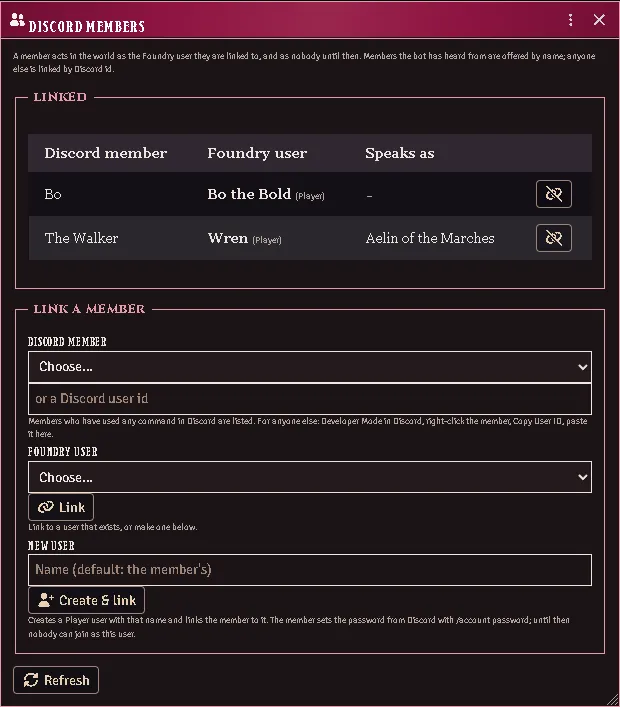
Three ways to connect a member of your server to a user in your world; all three end in the same place.
- In Foundry: Settings → Module Settings → ACKS II Extras → Discord
Members. Every link the world holds is listed, with who each member
speaks as. To make one, pick the member and the user and press Link.
The member list is everyone who has used any command in your server — ask
a new player to run
/whoamiand they appear by name; for anyone else, paste their Discord id (Developer Mode, right-click, Copy User ID). A member with no user yet: type a name, or leave it to take theirs, and press Create & link — a Player user is made and linked in one go. - In Discord:
/link set member: foundry:links to a user that exists. - In Discord:
/account create member:makes the Player user and links the member, the same as the window’s button.name:overrides the name.
A user made either way starts with a password nobody knows — not you, not the bot. Until the player sets one, nobody can join as that user.
Players set their own password from Discord: /account password new:,
eight characters or more. The reply is only theirs to see, the bot never
writes it to its log, and any Foundry session they had open is signed out
by the change. This is a player’s convenience, not a Judge’s tool: a member
can only set the password of the user they are linked to, and a Gamemaster
user’s password is never set from Discord at all, however the member is
linked — your seat is yours.
Discord itself carries what is typed into a command, as it carries any message. A table that would rather no password pass through Discord keeps using Foundry’s own user management, which is untouched by any of this.
Staying current
Section titled “Staying current”Nothing to do. Update the module in Foundry’s Add-on Modules like any
other. The bot checks the module’s manifest every half minute: when the
updater has replaced the directory it exits, the service restarts it on the
new code, puts its dependencies back if they went with the old directory, and
registers the commands again only if the release changed them. Your answers
live in the world and under /etc, neither of which the updater touches. The
journal shows the whole thing happen.
Restarting, starting, installing
Section titled “Restarting, starting, installing”Restart the bot sits at the top of the Discord Bot window whenever the
bot has recently been heard from. Press it and the bot exits and its service
brings it straight back, on whatever the window holds — the same path a
saved change takes, for when the bot is running and you want it to start
over anyway. It cannot start a bot that is not running or install one that is
not installed: Foundry has no hand on the host, and a request through the
world reaches only a bot that is already listening. Starting is the service’s
job (Restart=always, so a bot that exits or crashes is back within
seconds, and it comes up with the host), and installing is the one command in
Install the service, run again as often as you like.
On Windows the scheduled task’s loop does the service’s part.
On Windows
Section titled “On Windows”There is no service installer for Windows. Three steps take the place of Install the service; everything else in the walkthrough is the same.
-
Tell it how to reach the world. In the bot’s directory —
Data\modules\acks-extras\discordunder your Foundry data path — copy.env.exampleto.envand fill inFOUNDRY_ORIGIN,FOUNDRY_USERandFOUNDRY_PASSWORDfor the user from step 3. The bot is still configured from Foundry; the.envcarries only how to reach the world. Anything else you set there wins over the window, which is the escape hatch if you would rather keep the token on the host. -
Run it once by hand. Open PowerShell in that directory and run
npm.cmd start. The first run installs the bot’s dependencies (a minute or two), then the log shows the seat joining the world and the bot saying it has no token yet. Stop it with Ctrl+C. -
Have Windows start it. In the same PowerShell window, paste:
Terminal window $bot = (Get-Location).Path$loop = "Set-Location -LiteralPath '$bot'; while (`$true) { npm.cmd start; Start-Sleep -Seconds 5 }"Register-ScheduledTask -TaskName "ACKS Extras Discord bot" `-Action (New-ScheduledTaskAction -Execute "powershell.exe" -Argument "-NoProfile -WindowStyle Hidden -Command `"$loop`"") `-Trigger (New-ScheduledTaskTrigger -AtLogOn -User $env:USERNAME) `-Settings (New-ScheduledTaskSettingsSet -ExecutionTimeLimit ([TimeSpan]::Zero) -StartWhenAvailable)Start-ScheduledTask -TaskName "ACKS Extras Discord bot"The bot now starts whenever you sign in to Windows, and the last line starts it now. The loop is what keeps it running: the bot exits on purpose after a module update, a saved change in the Discord Bot window or Restart the bot, and the loop starts it again five seconds later. The zero time limit stops Task Scheduler from ending it after its default three days.
Then carry on at Configure it in Foundry.
To take it off again, stop and remove the task, then end the bot itself, which outlives the task’s own window:
Stop-ScheduledTask -TaskName "ACKS Extras Discord bot"Unregister-ScheduledTask -TaskName "ACKS Extras Discord bot" -Confirm:$falseGet-CimInstance Win32_Process -Filter "Name='node.exe'" | Where-Object CommandLine -match 'src[\\/]main\.mjs' | ForEach-Object { Stop-Process -Id $_.ProcessId }On a Linux box without systemd, the same .env and npm start run it by
hand. After a module update, or after a change in the window, you start it
again yourself.
Removing it
Section titled “Removing it”sudo npm run install-service -- --removestops the service and deletes the unit and the environment file. The module directory is untouched, and so is the configuration in your world — clear the token with the window’s own button if the bot is not coming back.
The Judge’s commands
Section titled “The Judge’s commands”/link set member: foundry:binds a Discord member to a Foundry user; the Foundry name autocompletes./link drop member:removes it and/link listshows every binding the world holds. A member linked to a Gamemaster user is a Judge in Discord too./account create member: name:makes a Player user for a member and links them (above)./party bind formation:makes the current channel a party’s channel; the formation autocompletes from the world’s parties./party showand/party unbindread and drop it./mapposts the party’s scene as the bot’s seat sees it, centred on the party token when the scene has one.scale:zooms (1 is the scene’s own size),private:shows it only to you. It is the Judge’s view, with everything the Judge can see; a players’-eyes map is planned. It needs Draw the map turned on in the bot’s window, and a host with hardware acceleration to turn it on for; otherwise it answers that the seat draws no canvas.
Playing
Section titled “Playing”/whoamisays which Foundry user you are linked to and who you are speaking as./character listshows the characters you own;/character use name:picks the one you speak and roll as from then on./sheetshows your character’s vitals, saves, purse and what is in hand, only to you unless you addpublic:.character:reads another character you own./roll what:makes a throw. The list autocompletes from everything the character’s sheet can roll: saves, checks, initiative, attacks by weapon, abilities. The card lands in the world’s chat as the character, and the result comes back to you in Discord./roll 2d6+3— any dice formula in the same command, for anyone in the server, linked or not. It is Foundry’s own dice:d20,3d6kh2,4dF,d%, exploding and rerolled dice all read as they do in Foundry’s chat. The result is posted to the channel with your name. If you are linked and have a character chosen, the world keeps the throw in its chat as that character too./account password new:sets your own Foundry password (above)./say text:speaks in the world’s chat as your character;emote:makes it an action instead of words.
If the bot has a chat channel, the world’s public chat appears there as it happens: what players in Foundry say and roll, and what the Judge posts. Whispers and blind rolls stay in Foundry, and a roll you made from Discord is not shown twice.
When something is off
Section titled “When something is off”npmdies at once withENOENT … process.cwd … uv_cwd. Your shell is inside a directory Foundry’s updater has since replaced — every module update deletes and recreatesmodules/acks-extras/.cdinto the directory again (the same path) and run the command again.- The installer seems to hang, or ends saying the service is not
running. Two causes before 7.1.2, both fixed: the questions were drawn
invisibly (the installer was waiting for an answer at a blank cursor —
pressing Enter took the default), and the first start installed the bot’s
dependencies out of sight. Now the questions show, npm runs in front of
you, and the installer ends with
systemctl is-activeand the journal’s last lines, which name the cause. Fix it and run the same command again. To run it with no questions at all, redirect stdin (</dev/null): every answer comes from the environment variable of the same name, else from the last install. - The installer stops at
npm error code EACCESon a path under/root/.npm, and says the dependencies could not be installed. Before 7.4.2 npm looked for its cache in root’s home rather than the service user’s — a directory that user cannot write. npm’s own advice there, to make root’s cache directory writable by someone else, is not the fix and is worth undoing if you took it. Update the module and run the install command again; nothing was enabled, so there is nothing to undo on the service side. On 7.3.2 specifically,sudo node src/install-service.mjs— the same installer, reached withoutnpm run— gets past it. - The token field is greyed out. It unlocks when the bot has announced
its key, which happens the moment the bot’s seat joins the world — so a
locked field means the service is not running, or its seat cannot reach
the world:
systemctl status acks-extras-discordand the journal. Press Refresh in the window once it is up. - The journal says
browser: … is the Chromium snap's stub, orexited with 1 before its devtools port opened. The seat has no browser it can run. Install one as in The host, then run the installer again — it offers the browser it found, and accepts a path you type. The lines the browser said, quoted in the journal, name a missing library when that is the cause (apt installwhat it names). - The seat never becomes ready. The journal names the step: the browser path, a world that is not running at the address you gave, or a Foundry user that does not exist with that password. Those four are the host’s answers — fix them by running the install command again.
- The commands do not appear in Discord. The bot registers them at start, on the server chosen in the window; check the journal for the registration line and that a server is chosen. Discord shows guild commands at once.
- The window says the token was sealed to a key the bot no longer holds.
The bot’s state directory was replaced (a rebuilt host, a removed
/var/lib/acks-extras-discord). Paste the token again and save. - The window says no bot has announced itself. Nothing has ever joined
this world as the bot. Check
systemctl status acks-extras-discordand the journal: the seat has to reach the world before anything can be configured. - “You are not linked”. The Judge links you —
/link setin Discord, or the Discord Members window in Foundry, where you are already listed by name because you just ran a command. - “That is not yours to do: a Gamemaster’s password…” By design. A Judge’s password changes in Foundry’s user management, never from Discord.
- A player cannot join as the user you made for them. They have not set
a password yet:
/account password new:in Discord. /mapanswers that the seat has no scene. Bind the channel to a party whose formation has a scene, or have the Judge view one; the seat shows the party’s scene when the channel has a party./mapanswers that the seat draws no canvas. Draw the map is off, which is the default. Turn it on in the bot’s window if — and only if — the machine running the bot has hardware acceleration.- Every command times out, though the bot is online and the world is up.
The seat is drawing the scene in software and starving itself. The journal
says so at start:
seat canvas: still up, alongside Foundry’s own “does not have hardware acceleration” warning atdebug. Turn Draw the map off.
Every feature here is free and none of it is gated. If it earns its keep at your table, you can chip in on Patreon.